
Time is money, and in the world of modern business, speed is the ultimate currency. If you are still manually typing out pricing estimates for every prospective client who emails you, you are likely losing both. In today's fast-paced digital landscape, consumers expect immediate answers, especially when it comes to pricing.
This is where a Free Quote Generator becomes your business's most valuable asset. By allowing prospects to input their needs and instantly receive an accurate cost estimate, you shift your sales process from reactive to highly proactive.
In this comprehensive guide, we will explore exactly how you can leverage a reliable quote generator to scale your operations, win back your time, and close more deals.
What Exactly is a Free Quote Generator?
Historically, when a service provider needed to send a price estimate, they relied on a static quotation template —usually a Word document or an Excel spreadsheet. You would download a free quote template, manually punch in the client's details, calculate the taxes, save it as a PDF, and email it back.
While offering a free quote is a standard business practice, the manual process behind it is incredibly inefficient.
A modern quote generator turns this static process into an interactive experience. Instead of you filling out a basic quote template behind the scenes, the prospective client interacts directly with a web-based interface. They answer a few questions about their project, and the software instantly calculates the totals. Many tools also let you export the result into a branded quotation template or a reusable free quote template for your records.
The Benefits of Instant Online Pricing
Shifting from manual spreadsheets to automated digital tools profoundly impacts your bottom line. Understanding the benefits of instant online pricing can help you see why this transition is necessary for growth.
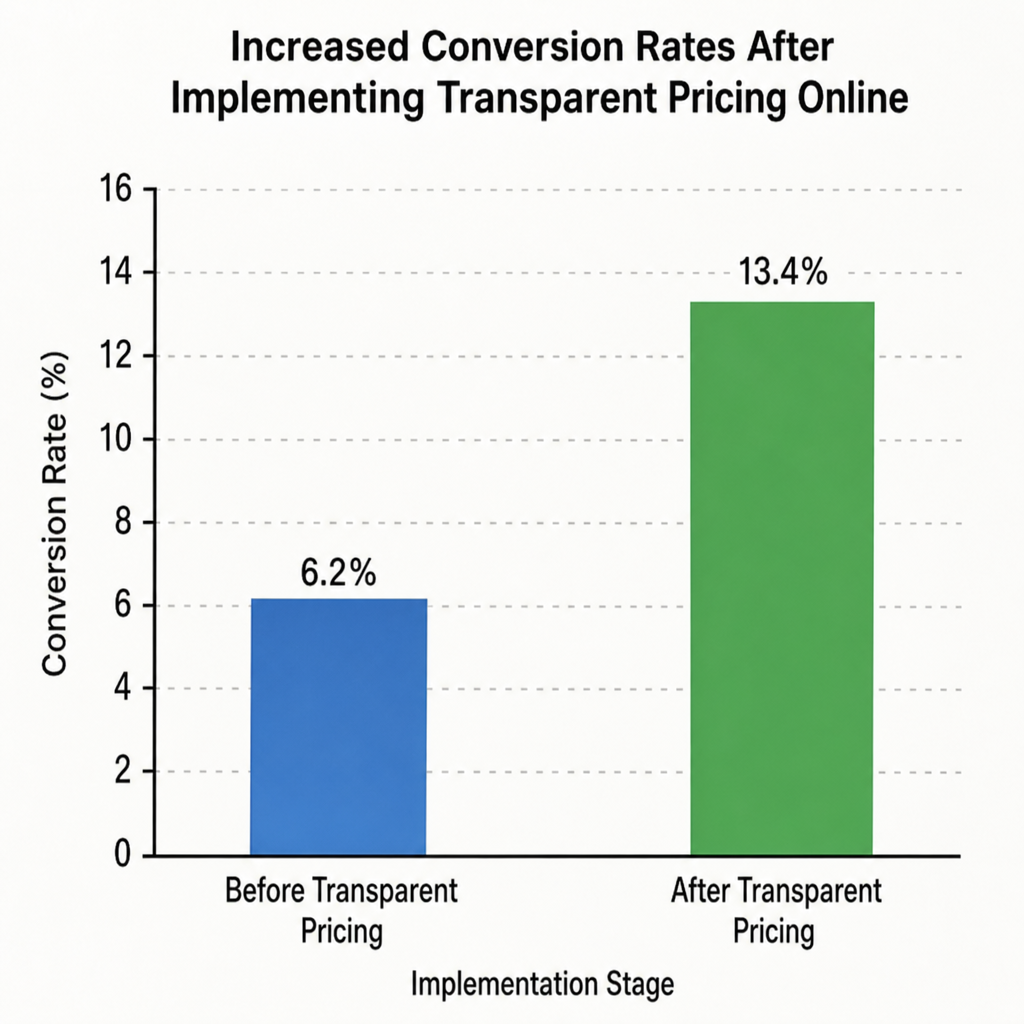
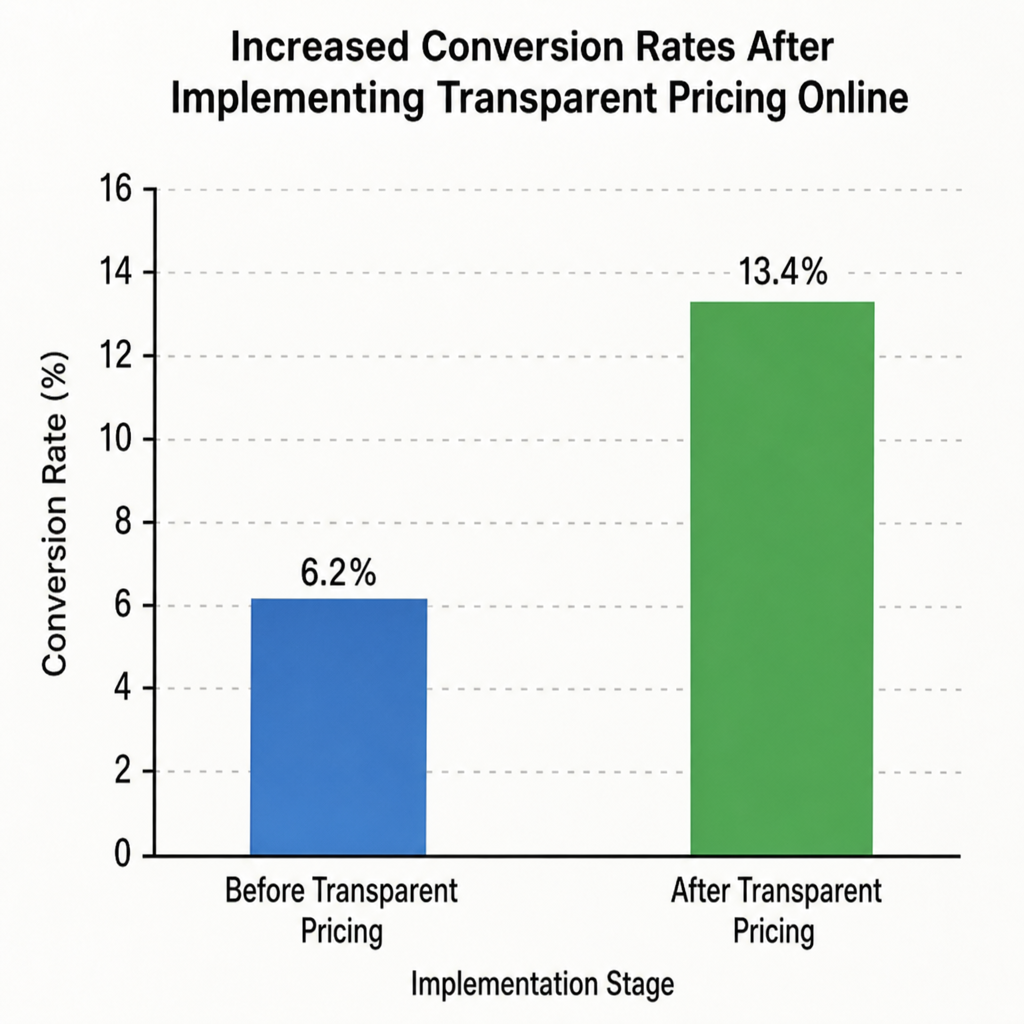
- Improving conversion rates with transparency: Modern buyers are highly skeptical of hidden costs. When you provide immediate, clear pricing on your website, you eliminate the "fear of the unknown." Prospects are much more likely to convert into paying clients when they feel informed.
- Reducing manual quote response time: If a potential client contacts three agencies, the one that replies first with an accurate price usually wins the contract. Automation drops your response time from days or hours down to milliseconds.
- Filtering out unqualified leads: Instant quoting acts as a gatekeeper. If a prospect's budget is significantly lower than your minimum engagement fee, an instant calculator gently disqualifies them, saving your sales team valuable time.
How to Build a Custom Price Calculator for Websites
You might assume that creating an interactive calculator requires a team of expensive software developers. Fortunately, the rise of intuitive SaaS tools has changed the game entirely. Today, you can build a custom price calculator for websites using accessible no-code form builders for calculations.
Here is a step-by-step approach to setting it up effectively:
Step 1: Ditch the Static Documents
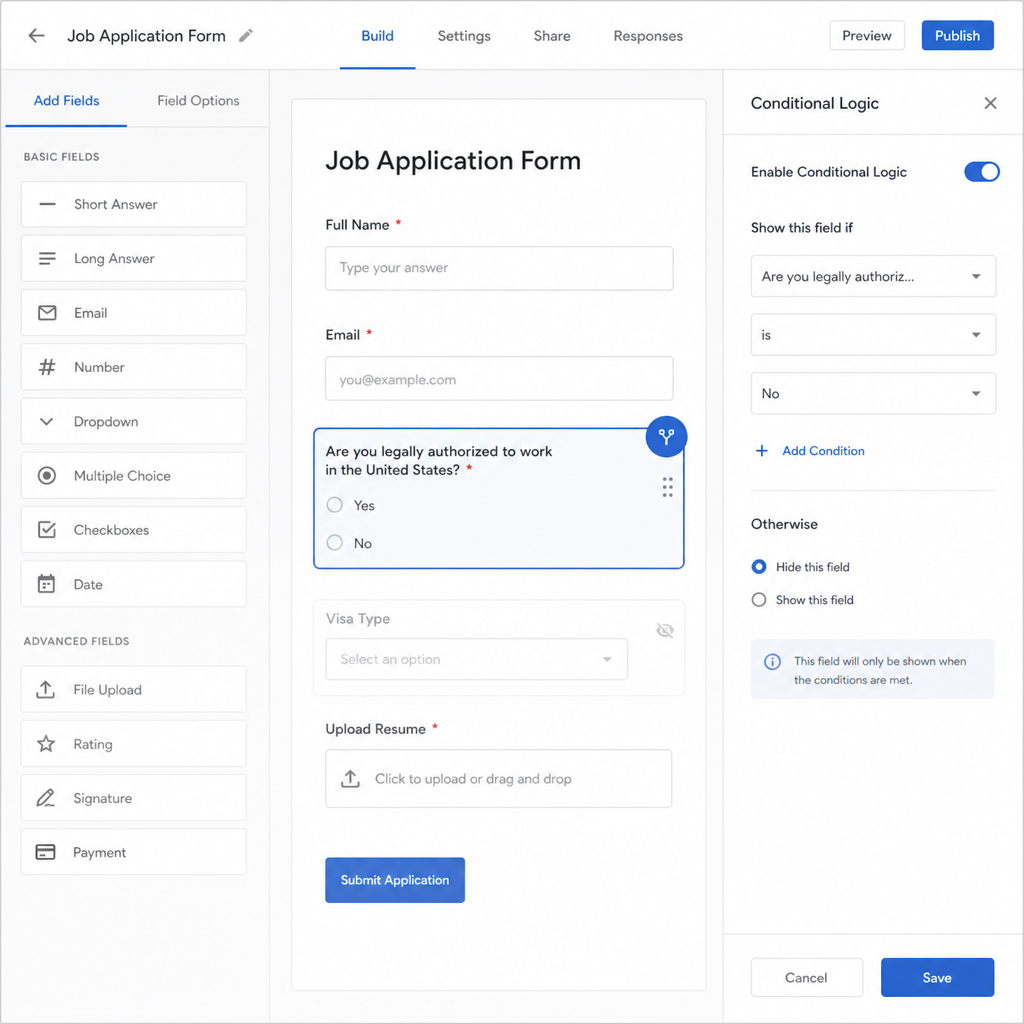
The first step is to transition away from offline files. Choose a reputable online quotation maker. Look for platforms that offer conditional logic and calculation fields. Your goal is to replicate the exact math you do in your head or on a spreadsheet, but within a digital form.
Step 2: Implement Multi-Step Lead Qualification Workflows
Nobody likes a long, intimidating form that asks for twenty pieces of information on a single page. To keep users engaged, break your generator down into multi-step lead qualification workflows.
This approach is highly aligned with lead generation form best practices. Start with easy, low-friction questions (e.g., "What type of service are you looking for?") before moving on to more detailed inquiries (e.g., "What is the square footage of your property?"). Save the contact information request—name, email, and phone number—for the very last step.
Step 3: Establish Dynamic Pricing Models for Services
Not every business operates on flat-rate pricing. If you run a cleaning company, a marketing agency, or a catering business, your prices fluctuate based on specific variables.
Your quote generator must be able to handle dynamic pricing models for services. For instance:
- Base Fees: Start with a minimum project fee.
- Per-Unit Multipliers: Add costs based on hours, words, square feet, or headcount.
- Add-Ons and Upsells: Include checkboxes for premium features (e.g., "Add a 24-hour rush delivery for $50").
By coding these rules into your form builder, the software calculates complex variables seamlessly in the background.
Optimizing Service Inquiry Forms for Maximum Engagement
Simply placing a calculator on your website isn't enough; it needs to be optimized to guarantee users actually complete it. When you focus on deliberately optimizing service inquiry forms , you are effectively streamlining sales inquiry process from start to finish.
Here are a few actionable tips to maximize engagement:
- Focus on Clarity: Use simple, jargon-free language for your questions. If an industry term is necessary, provide a brief tooltip explaining what it means.
- Show the Math: Emphasize building trust through cost breakdowns. Instead of just flashing a single, large total at the end of the generator, show an itemized list. Let the user see exactly how much the base service costs versus the optional add-ons.
- Mobile Responsiveness: A significant portion of your traffic will come from mobile devices. Ensure buttons are large enough to tap, and sliders are easy to manipulate on smaller screens.
- Clear Call to Action (CTA): Once the quote is generated, what should the user do next? Include a prominent button that says "Book Now," "Schedule a Consultation," "Download My Free Quote," or "Save My Quote."
Taking Automation Further: From Quotation Maker to Closed Deal
A truly optimized business doesn't stop at just showing the price. The real magic happens when you connect your pricing tools to your broader tech stack. If you have ever wondered how to automate price estimates end-to-end, the secret lies in seamless integrations.
CRM Integration for Automated Bidding
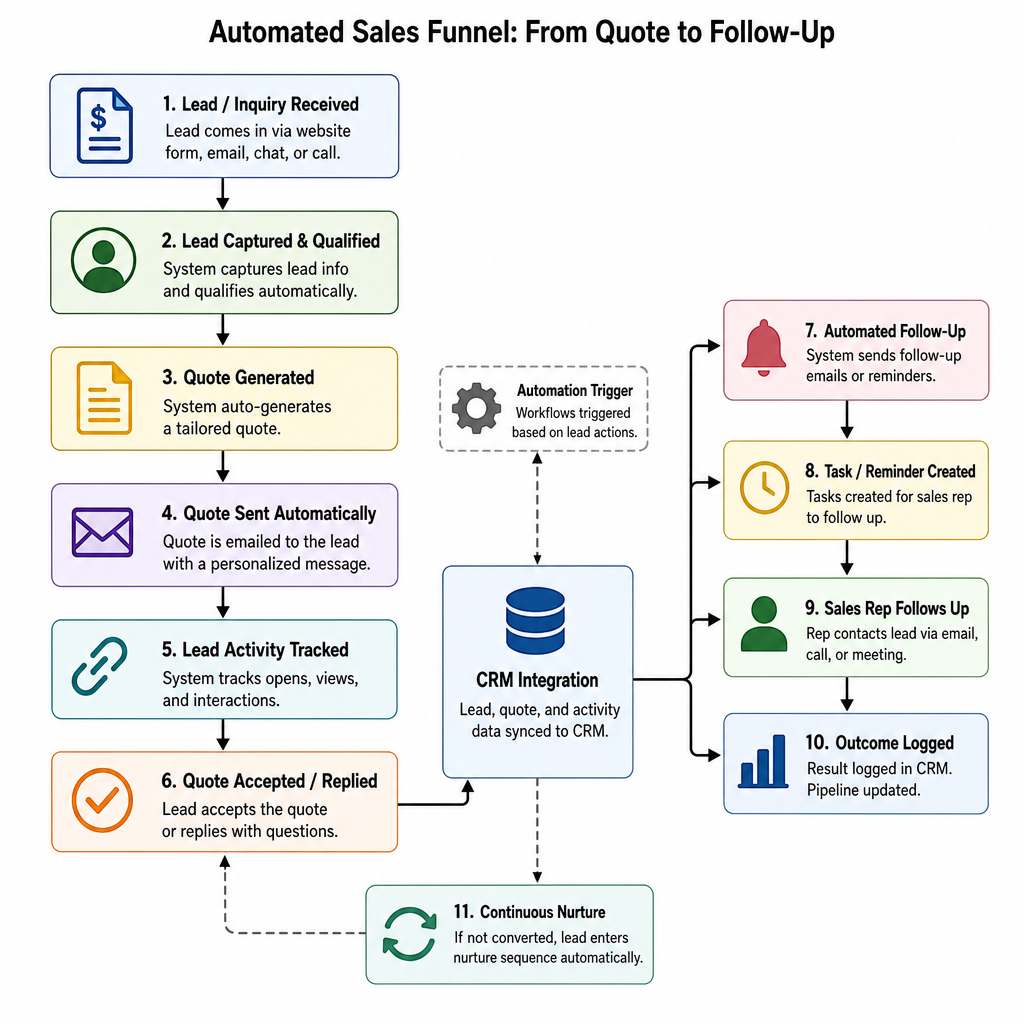
Your quote generator should never exist in a vacuum. By setting up CRM integration for automated bidding, every single time a prospect completes your form, their data—along with the exact quote they received—is pushed directly into your Customer Relationship Management (CRM) system, such as HubSpot, Salesforce, or Pipedrive.
This enables your sales team to see exactly what the client is interested in before making a follow-up call. If the prospect abandons the process without booking, the CRM can trigger a customized email saying, "Hi [Name], I saw you were looking at a quote for a website redesign. Do you have any questions about the $2,500 estimate?"
Creating Automated Sales Funnel Entry Points
Pricing pages are among the highest-converting pages on any website. By replacing a generic "Contact Us for Pricing" button with a dynamic tool, you establish highly effective automated sales funnel entry points.
Once the lead submits their email to view the quote, they enter your automated marketing funnel. You can now send them targeted drip campaigns, case studies, and testimonials directly related to the service they inquired about, nurturing them until they are ready to sign a contract.
Why You Should "Make It A Quote" Today
We live in an on-demand economy. If a potential customer visits your website at 2:00 AM on a Sunday, they don't want to wait until Monday afternoon to find out if they can afford your services. They want answers immediately.
If you have standardized pricing rules in your head, there is absolutely no reason you shouldn't make it a quote that prospects can access 24/7. By implementing interactive cost estimation tools, you empower your customers to self-educate and self-qualify.
You no longer have to spend hours drafting proposals for leads who suffer from "sticker shock." Instead, you spend your time talking to highly qualified prospects who already know your prices, understand your value, and are ready to finalize the deal.
Conclusion
Transitioning to a Free Quote Generator is one of the highest-leverage moves a modern business owner can make. It bridges the gap between client curiosity and serious intent.
By stepping away from outdated, static files and embracing automated, dynamic calculators, you create a frictionless experience for your buyers. You build immediate trust through pricing transparency, drastically reduce administrative overhead, and ensure that your sales pipeline remains full of qualified leads. Stop manually crunching numbers today—let the software do the heavy lifting so you can focus on what you do best: growing your business.
Q&A
Question: What is a Free Quote Generator, and how is it different from using a static quotation template?
Short answer: A Free Quote Generator is a web-based tool that lets prospects input their project details and instantly receive a calculated estimate. Unlike static Word or Excel templates that require manual entry, a generator uses conditional logic and calculation fields to automate the math, display results instantly, and often export to a branded quotation template for your records.
Question: How does instant online pricing improve conversions and save sales time?
Short answer: Transparency boosts trust by eliminating fear of hidden fees, which increases conversion rates. Automation slashes response times from hours or days to milliseconds—often winning the deal when buyers compare multiple providers. It also filters out unqualified leads by showing realistic costs upfront, saving your team from pursuing mismatched opportunities.
Question: Can I build a custom price calculator without coding skills? How?
Short answer: Yes. Choose a reputable online quotation maker with conditional logic and calculation fields. Structure it as a multi-step workflow that starts with easy questions and asks for contact details last. Implement dynamic pricing rules—such as base fees, per-unit multipliers (hours, words, square footage, headcount), and add-ons/upsells—so the tool can handle real-world pricing complexity.
Question: What are best practices for optimizing the quote form so users complete it?
Short answer: Keep questions clear and jargon-free, using brief tooltips when needed. Show an itemized cost breakdown to build trust, not just a single total. Ensure mobile responsiveness with tap-friendly controls. Finish with a prominent CTA like “Book Now,” “Schedule a Consultation,” “Download My Free Quote,” or “Save My Quote” to guide the next step.
Question: How do I connect the quote generator to my CRM and automate follow-up?
Short answer: Integrate the generator with your CRM (e.g., HubSpot, Salesforce, Pipedrive) so each submission—including the exact quote—syncs automatically. This enables immediate, personalized follow-ups and targeted drip campaigns. Replacing “Contact Us for Pricing” with an interactive calculator also creates a high-converting entry point into your automated sales funnel.