
Have you ever finished an amazing project only to freeze when it's time to ask for payment? Staring at a blank Word document trying to format a bill is a frustrating reality for many new entrepreneurs. According to small business experts, this manual friction doesn't just waste your valuable time—it creates a professionalism gap that makes clients take your business less seriously.
Transitioning from a hobbyist to a trusted authority requires a fundamental shift in how you present your work. By adopting a Free Invoice Generator, you instantly replace clumsy text emails with a polished, structured record. In practice, clean and consistent formatting reduces payment delays because clients immediately understand exactly what they owe and how to pay it.
Suddenly, you are no longer awkwardly asking for cash. Using a reliable invoice maker gives you access to professional billing document templates for freelancers, turning a stressful chore into a standardized business routine. Instead of apologizing for a disorganized bill, you can issue a clear statement, get paid faster, and confidently step into the role of an empowered business owner.
Why Ditching Spreadsheet Templates Prevents Costly Manual Entry Errors
You've done the hard work, but relying on an old Excel document to format your bill can be unnecessarily frustrating. Comparing modern online billing tools vs manual spreadsheet templates quickly reveals a hidden risk: human error. When rushing to send a bill to a client, simple typos can cost you money.
These DIY documents regularly lead to unprofessional mistakes that delay your payout. Beware of these four common spreadsheet billing errors:
- Breaking a math formula without noticing.
- Creating duplicate invoice numbers that confuse your tax records.
- Forgetting to add the appropriate sales tax.
- Leaving outdated contact information from a previous file.
Upgrading to a dedicated generator solves these problems by minimizing manual entry errors in service billing. Instead of fighting rigid layout boxes, simply type your tasks into line items—think of these as a clear shopping list of your work. The software then executes automated tax calculations, instantly determining exact percentages so you never undercharge or break a formula again.
Trusting the system with the math means you can confidently submit your payment request without triple-checking a calculator.
The Anatomy of a Perfect Invoice: 7 Essential Components You Can't Ignore
Sending a polished bill separates a thriving business from a casual hobby. When you learn how to format professional service receipts, you do more than just ask for money—you create a professional record of your work.
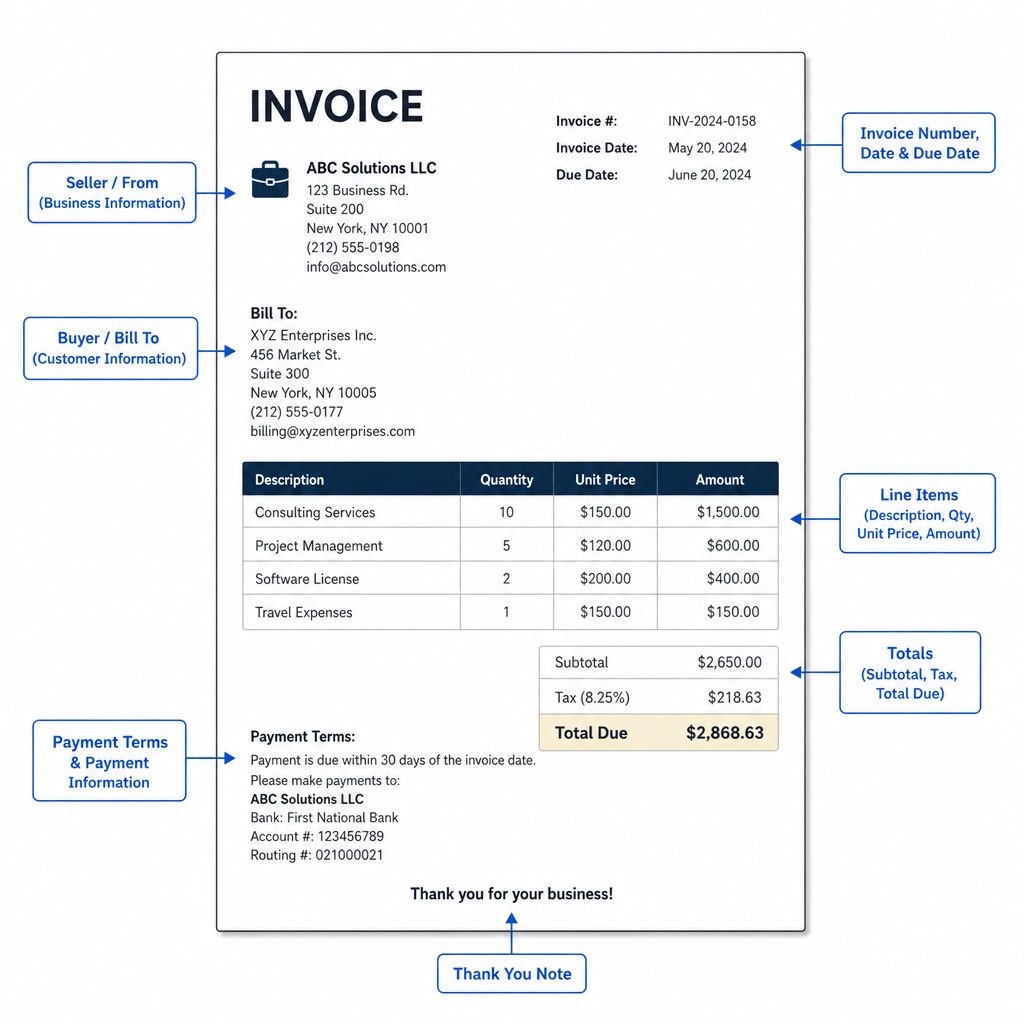
Properly structured details protect you during tax season. Every document needs a Unique Invoice ID—a sequential number (like #001, then #002) that makes record searching easy and prevents accounting overlaps. Depending on your location, you might also need to display your personal Tax ID to create legally compliant billing statements for international services or local contracts.
To guarantee you get paid without awkward follow-ups, your document must include clear instructions. Understanding the essential components of a standard business invoice means mastering these seven must-have fields:
- Unique ID: For simple record searching and organization.
- Date: The exact day the billing clock starts.
- Description: A clear line-item shopping list of your completed work.
- Tax ID: Your required legal business identifier.
- Terms: The rules of the game. Setting terms to "Net 30" gives the client 30 days to pay, while "Due on Receipt" requires immediate payment.
- Subtotal: The exact math calculation before taxes are applied.
- Payment Instructions: Exactly how and where clients should send the money.
Generating these documents quickly without starting from scratch is where cloud-based systems excel, automating this entire checklist.
How Cloud-Based Systems Streamline Client Payments and Record Keeping
Moving away from manual Word documents brings immediate relief to busy freelancers. One of the biggest benefits of using cloud-based billing systems is that your information lives securely online rather than being trapped on a single laptop. Imagine finishing a logo design and generating the bill right from your phone before leaving the coffee shop. Because these platforms automatically save your client details and standard rates, you never have to retype the same information twice.
Many services also include a free invoice generator with a reusable invoice template, and options like invoice home help you spin up professional documents without extra cost.
That centralized history becomes a lifesaver when April rolls around. Instead of digging through old email threads or messy spreadsheets, organizing financial records for tax season preparation becomes completely automated. Every transaction is neatly tracked in one digital dashboard. You can instantly see exactly how much you earned throughout the year, identify who still owes you money, and download a simple summary to hand straight to your accountant.
Beyond saving administrative time, these online tools ensure your client receives a flawless document. Generating your bill this way unlocks customizable PDF layout options for contractors, which freeze your formatting in place so it looks perfect on any screen. A standard PDF guarantees your margins won't shift and your logo won't stretch, making it incredibly easy for clients to save and file away. Making it effortless for clients to submit their payments securely is the final step in a streamlined workflow.
Getting Paid 3x Faster: The Power of Secure Payment Link Integration
Sending a beautiful invoice is only half the battle; the true goal is getting money into your bank account quickly. When clients have to hunt down your payment details or write a physical check, this "digital payment friction" creates unnecessary delays. You can eliminate this roadblock by using secure payment link integration for digital billing. A simple "Pay Now" button lets clients settle their tab instantly using their credit card or standard processor.
To master streamlining client payment collection processes, you must combine instant access with clear expectations. You can drastically speed up your cash flow by implementing three crucial strategies:
- Adding a clickable digital payment link directly on the invoice document.
- Setting clear due dates so the client knows exactly when the clock starts.
- Using automated late-payment reminders to handle the follow-up without ever sounding pushy.
For those who have clients on monthly retainers, you can remove manual work entirely. Setting up recurring billing schedules for service-based businesses means your software automatically generates and sends the bill on the same day every month. Getting paid faster gives you more freedom to actually focus on growth.
How to Professionalize Your Brand Identity Without a Graphic Designer
The difference between a side hustle and an established business often comes down to visual polish. When you add your existing logo and colors to your billing, you instantly build client confidence through visual consistency. You do not need a design degree to achieve professional branding for client-facing financial documents; you just need to put your existing assets to work.
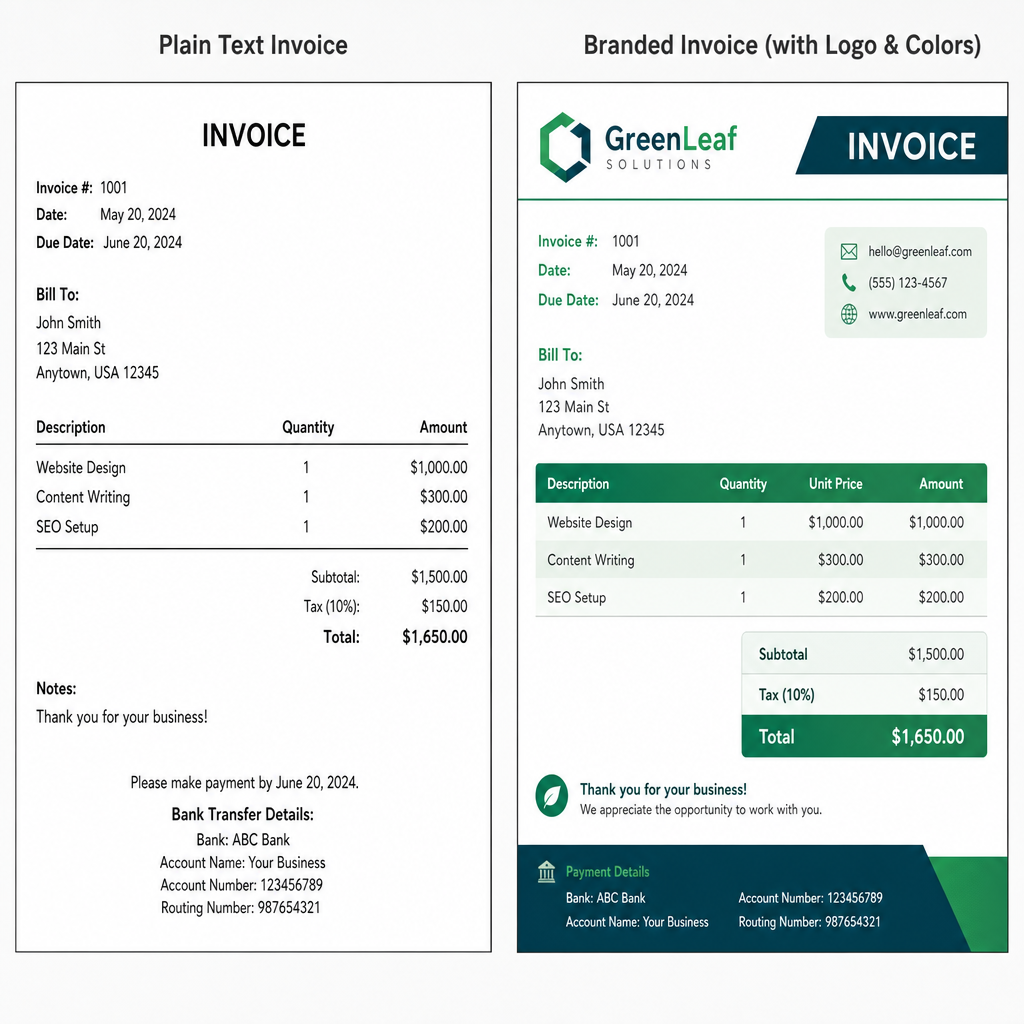
Selecting the right invoice template lets you easily match your industry's specific aesthetic. Whether you are a creative agency needing a modern layout or a contractor who prefers a traditional look, pre-built designs do the heavy lifting for you. This simple choice transforms a basic request for payment into a memorable brand touchpoint.
Maintaining this cohesive style across all your paperwork remains critical even after a client pays. By utilizing a matching receipt generator, you ensure every interaction looks unified from the first quote to the final payment confirmation. With your visual identity beautifully locked in, transitioning from manual to automated billing takes only minutes.
Your 5-Minute Action Plan: Moving from Manual to Automated Billing
Gone are the days of staring at a blank document, wondering if your payment requests look legitimate. You now possess a practical blueprint for how to create invoices that clearly communicate your professional value.
Put this clarity into action for your next billing cycle using a reliable invoice generator. You can create your first professional invoice in under 5 minutes with this 3-step setup guide:
- Choose a template
- Input your first client
- Set your payment terms
Once sent, this standardized system becomes your foundation for how to track outstanding client payments effectively, eliminating the usual guesswork from your accounts.
Sending a polished document signals a strong professional standard. By eliminating administrative friction from your billing process, you establish clear boundaries, encourage faster payouts, and preserve your energy for the work you actually enjoy.
¿Prefieres leer en español? Lee nuestra guía Cómo usar un Generador de Factura gratuito.
Q&A
Question: Why should I use a free invoice generator instead of Word or Excel?
Short answer: A free invoice generator removes manual friction and closes the “professionalism gap” that can slow payments. Unlike DIY docs, it minimizes human error and standardizes your billing. Common spreadsheet pitfalls—broken formulas, duplicate invoice numbers, missing sales tax, and outdated contact info—disappear with automated calculations, sequential IDs, and saved client details. You get a polished, structured invoice that’s easy to understand and pay, which reduces delays and makes your business look credible.
Question: What information must every professional invoice include?
Short answer: At minimum, include these seven essentials to create a clear, compliant record and speed up payment:
- Unique ID: A sequential number (e.g., #001, #002) for easy tracking.
- Date: The day the billing clock starts.
- Description: Clear line-item details of the work delivered.
- Tax ID: Your legal identifier, if required by your location or contract.
- Terms: Payment timing (e.g., Net 30 vs. Due on Receipt).
- Subtotal: Exact pre-tax amount.
- Payment Instructions: How and where to pay.
Structuring invoices this way protects you at tax time and makes follow-ups less awkward.
Question: How do cloud-based invoicing tools streamline payments and record-keeping?
Short answer: They securely store your data online and save reusable details (clients, rates, templates) so you don’t have to retype information. Many services include free generators and templates that let you create professional PDFs whose layout won’t shift on different screens. A centralized dashboard tracks income, outstanding invoices, and year-to-date totals, then produces simple summaries you can hand to your accountant—no more digging through emails or spreadsheets. The result is faster document creation, cleaner records, and fewer admin headaches.
Question: How can I get paid faster using my invoices?
Short answer: Reduce payment friction and set clear expectations:
- Add a secure “Pay Now” link or button directly on the invoice.
- Set explicit due dates so the clock is unambiguous.
- Enable automated late-payment reminders to follow up without sounding pushy.
- For retainers, use recurring billing so invoices send automatically each month.
These steps combine instant access with predictable timing, often accelerating cash flow.
Question: What’s the fastest way to switch from manual to automated billing?
Short answer: You can be up and running in under five minutes:
- Choose a template (apply your logo and colors for a professional look).
- Input your first client (the system will save details for reuse).
- Set your payment terms (e.g., Net 30 or Due on Receipt).
Once sent, your standardized invoices form the foundation for tracking outstanding payments and keeping your books organized with minimal effort.