
Getting paid for your hard work shouldn't be the most stressful part of running a business. Yet, for many freelancers, entrepreneurs, and small business owners, the billing process often feels like a daunting administrative chore. If you want to maintain a healthy cash flow, build trust with your clients, and project a polished image, mastering the art of billing is absolutely critical.
Welcome to the ultimate Invoicing Guide: How To Make Invoices. In this comprehensive walkthrough, we will cover everything from the basic anatomy of a bill to advanced strategies for ensuring you get paid on time, every time.
What Information Goes on an Invoice?
Before you hit "send," you need to ensure your document contains all the necessary data. So, exactly what information goes on an invoice? Missing even one crucial detail can delay your payment or cause confusion for your client's accounting department.
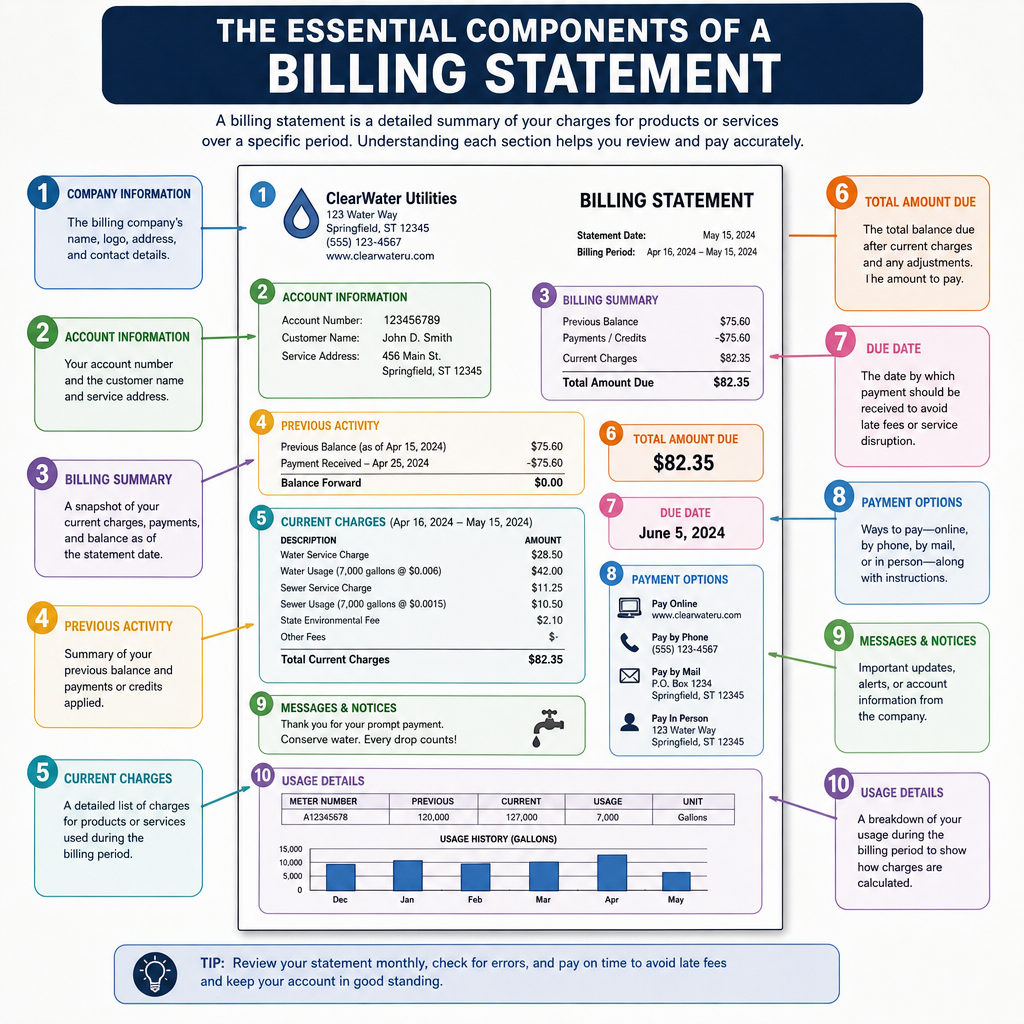
To meet standard professional invoice requirements, your document must be clear, legally compliant, and easy to read. Here are the essential components of a billing statement that you should always include:
- A Clear Header: The word "INVOICE" should be written clearly at the top.
- Unique Invoice Number: A sequential number (e.g., INV-1001) helps both you and your client track the document.
- Company Information: Your business name, address, phone number, and email.
- Client Information: The name, company, and address of the person or business you are billing.
- Dates: Both the date the invoice was issued and the payment due date.
- Itemized Description of Services: Break down the work provided. Avoid vague terms; instead of "Writing," use "Website Copywriting: Home and About Pages (10 hours)."
- Financial Breakdown: The subtotal, any applicable taxes or discounts, and the grand total owed.
- Legal/Tax Details: Depending on your region, you may need to include your tax identification number for billing purposes (such as a VAT number, EIN, or equivalent).
Crafting Your Document: Templates and Formats
You don't need to be a graphic designer to create a beautiful, professional bill. However, presentation matters.
Finding the Right Design
If you are just starting out, using a sample billing invoice template is the smartest move. You can find free templates in Microsoft Word, Google Docs, or Canva. A strong template allows you to focus on branding your business through invoice design. Adding your company logo, utilizing your brand’s color palette, and choosing a clean, readable font subtly reinforces your professionalism and keeps your brand top-of-mind.
For independent contractors, the ideal freelancer invoice format is usually streamlined and straightforward. It strips away complex corporate jargon but retains all the legal weight necessary to demand payment. Adopting freelance invoicing best practices—such as clearly stating your project milestones and attaching relevant timesheets—will save you from endless client back-and-forth.
Understanding Document Types
As your business grows, you will encounter different types of billing documents. It is vital to understand the purchase order vs invoice distinction. A purchase order (PO) is generated by the buyer to request goods or services, whereas an invoice is generated by the seller to request payment for those goods or services. Always reference the client's PO number on your bill if they provided one.
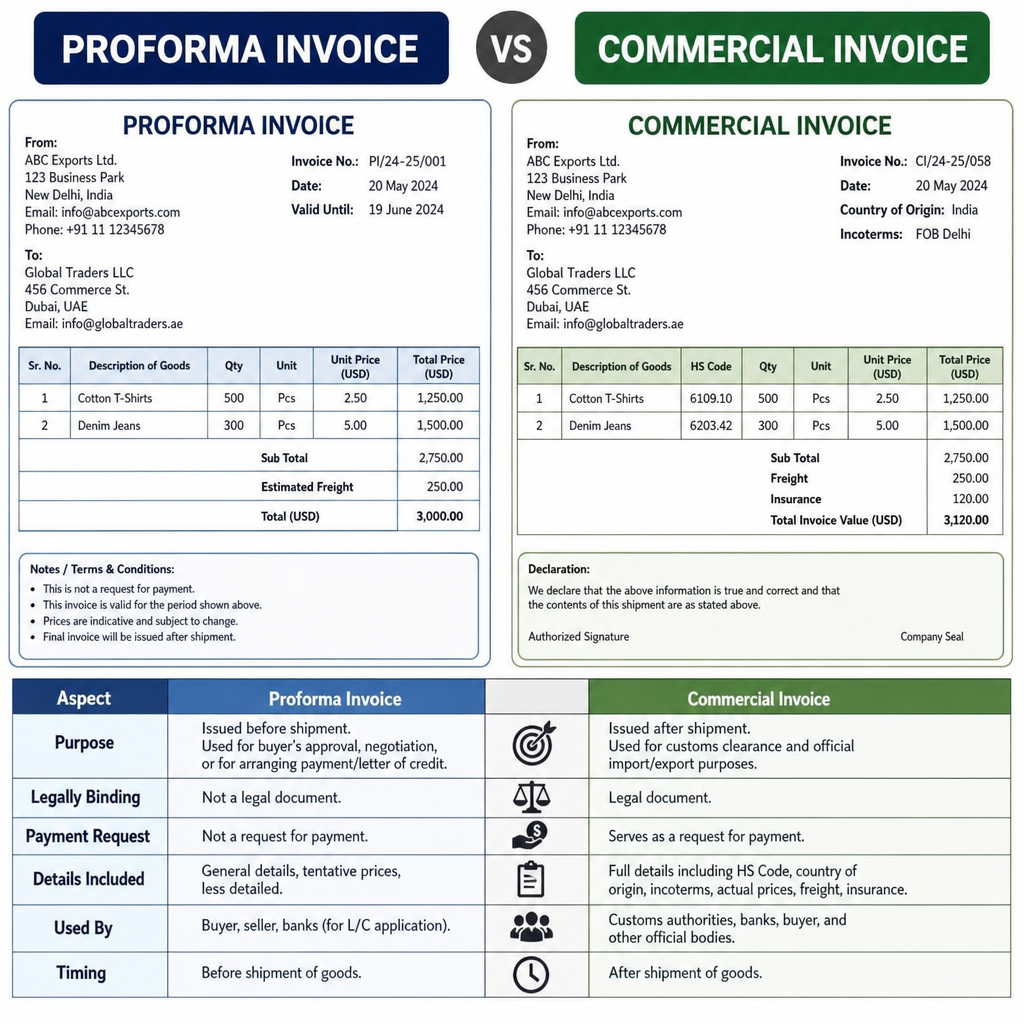
Furthermore, you might need to know the difference between a proforma invoice vs commercial invoice. A proforma invoice is essentially an estimated bill sent before the final details of a project or shipment are completed. It helps the buyer understand the expected costs. A commercial invoice is the final, legally binding demand for payment issued after the service is rendered or the product is shipped.
Manual vs Digital Invoicing Methods
When figuring out how to get invoices ready for your clients, you will face a critical choice regarding your workflow. The debate between manual vs digital invoicing methods usually comes down to your business size, budget, and transaction volume.
Manual Invoicing: This involves using a word processor or spreadsheet to create PDFs. While it has zero upfront software costs, manual billing is incredibly time-consuming. You have to manually update invoice numbers, calculate taxes, and physically type out emails. It is highly susceptible to human error.
Digital Invoicing: Upgrading to online invoicing software (like QuickBooks, FreshBooks, Xero, or Wave) is a game-changer. These platforms provide built-in templates and securely store your clients' details.
As your client roster expands, investing in invoice automation software becomes essential. The benefits of automated billing systems are vast. They automatically calculate totals and taxes, convert currencies, and integrate directly with your bank account. More importantly, they drastically reduce the administrative hours you spend chasing money, allowing you to focus on actual revenue-generating work.

The Sending Process: Timing and Best Practices
Creating the document is only half the battle; knowing the optimal way to deliver it is just as important.
Timing Your Delivery
A common question among new business owners is when to send an invoice after service is completed. The golden rule is: as soon as possible. Prompt billing demonstrates that you are organized and expect prompt payment in return. If you wait two weeks to send invoices, your client will likely take their time paying them, stretching your cash flow thin. For larger projects, consider billing in milestones (e.g., 30% upfront, 30% midway, 40% upon completion).
Delivery Methods and Payment Terms
So, practically speaking, how do you send an invoice? While physical mail is still used in some traditional industries, emailing a secure PDF or sending a direct link via your billing software is the modern standard. Always address the email to the specific person in charge of accounts payable, use a clear subject line (e.g., "Invoice INV-1042 from [Your Company]"), and include a brief, polite message.
Crucially, your document must include exact payment expectations. Ambiguity is the enemy of fast payments. Provide clear invoice payment terms examples right on the document. Instead of vaguely stating "Pay soon," use industry-standard terms backed up by plain English:
- Net 30: "Payment is due within 30 days of the invoice date."
- Due Upon Receipt: "Payment is expected immediately upon receiving this document."
- Net 15 with Early Discount: "Payment due in 15 days. A 2% discount applies if paid within 5 days."
Managing Your Cash Flow and Following Up
Even with the perfect system in place, you will occasionally run into roadblocks. Knowing how to navigate these bumps is a hallmark of a seasoned professional.
Handling Overdue Accounts
It is incredibly frustrating when a client misses a deadline. Knowing how to deal with overdue payments gracefully but firmly is a vital skill.
- Day 1 Overdue: Send a polite, friendly email reminder. Assume they simply forgot.
- Day 7 Overdue: Send a firmer reminder, attaching the original bill again.
- Day 15-30 Overdue: Pick up the phone. A direct conversation often resolves issues faster than a dozen emails.
- Enforce Late Fees: If you stated a late fee policy in your original contract and payment terms, enforce it. This trains clients to prioritize your bills in the future.
Managing Ongoing Work
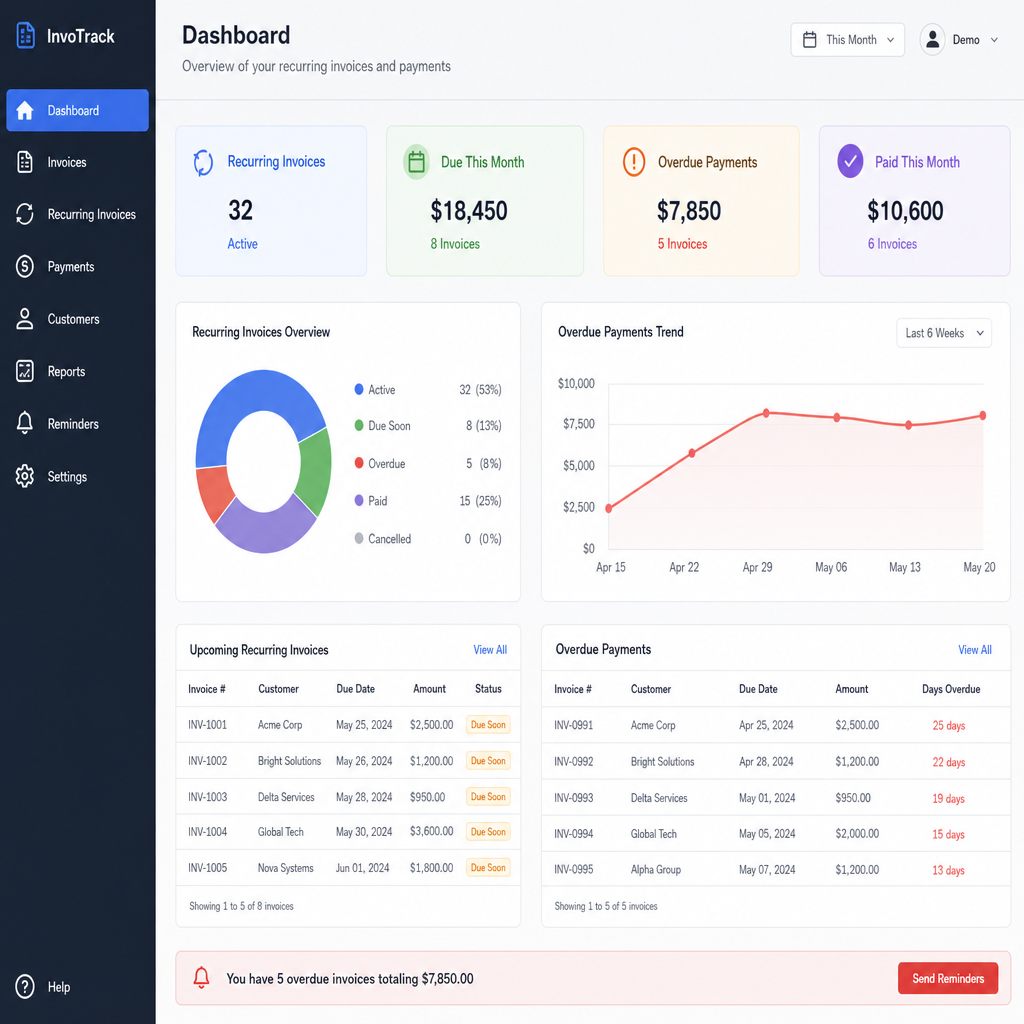
For clients on retainers or subscription models, you need a system for how to track recurring invoices. This is where automated software truly shines. You can set up a recurring profile that automatically generates and emails the bill on the 1st of every month. The software's dashboard will show you at a glance which recurring payments have cleared and which are pending, taking the mental math out of your monthly projections.
Common Invoicing Mistakes to Avoid
To ensure your billing process is as frictionless as possible, be on the lookout for these frequent pitfalls. Here are a few common invoicing mistakes to avoid:
- Failing to Itemize Properly: If a client doesn't understand what they are paying for, they will dispute the bill. Always be specific.
- Sending to the Wrong Person: Sending your bill to the marketing director when it needs to go directly to the accounting department will cause massive delays. Always ask your point of contact who should receive the financial documents.
- Making it Hard to Pay: If you only accept paper checks in a digital world, you will get paid slower. Offer multiple payment gateways, such as credit cards, direct bank transfers (ACH), and digital wallets like PayPal or Stripe.
- Surprise Fees: Never add unexpected expenses to a final bill without discussing them with the client first. Transparency builds long-term trust.
Conclusion
Mastering your billing process is about much more than just demanding money; it is about establishing clear communication, setting professional boundaries, and ensuring the financial health of your business. By understanding the essential components of a bill, utilizing proper templates, and embracing modern software, you transition from a stressful, manual chore to a streamlined, automated workflow.
Implement the steps in this guide today. Revamp your design, clarify your payment terms, and don't be afraid to leverage technology to do the heavy lifting. When you make it easy and clear for your clients to pay you, you will find that your money hits your bank account faster, leaving you with more time to focus on what you actually love doing—growing your business.