
Every successful business runs on a delicate balance of money coming in and money going out. While generating revenue gets most of the spotlight, managing how money leaves your company is equally critical to your financial health. If your finance team is drowning in paperwork, missing early payment discounts, or dealing with unhappy suppliers, it is time to rethink your back-office operations.
In today's fast-paced business environment, modernizing your accounts payable department is no longer optional—it is a necessity. By streamlining your financial workflows, you can save time, reduce costly errors, and build stronger relationships with your vendors.

Decoding the Basics: What is Invoice Processing?
If you are new to financial operations or looking to restructure your department, you might be asking: exactly what is invoice processing?
At its core, invoice processing is the complete lifecycle of a supplier invoice. It begins the moment a company receives an invoice bill (sometimes typed as 'invoice bil') from a vendor for goods or services provided, and it ends when the invoice payments have been successfully settled and recorded in the general ledger.
This cycle typically falls under the umbrella of accounts payable (AP). The standard process involves receiving the document, extracting the relevant data, verifying the purchase, securing internal approvals, and finally initiating the payment. While this sounds straightforward in theory, executing it efficiently at scale requires a highly organized system.
The Hidden Costs of Traditional Accounts Payable
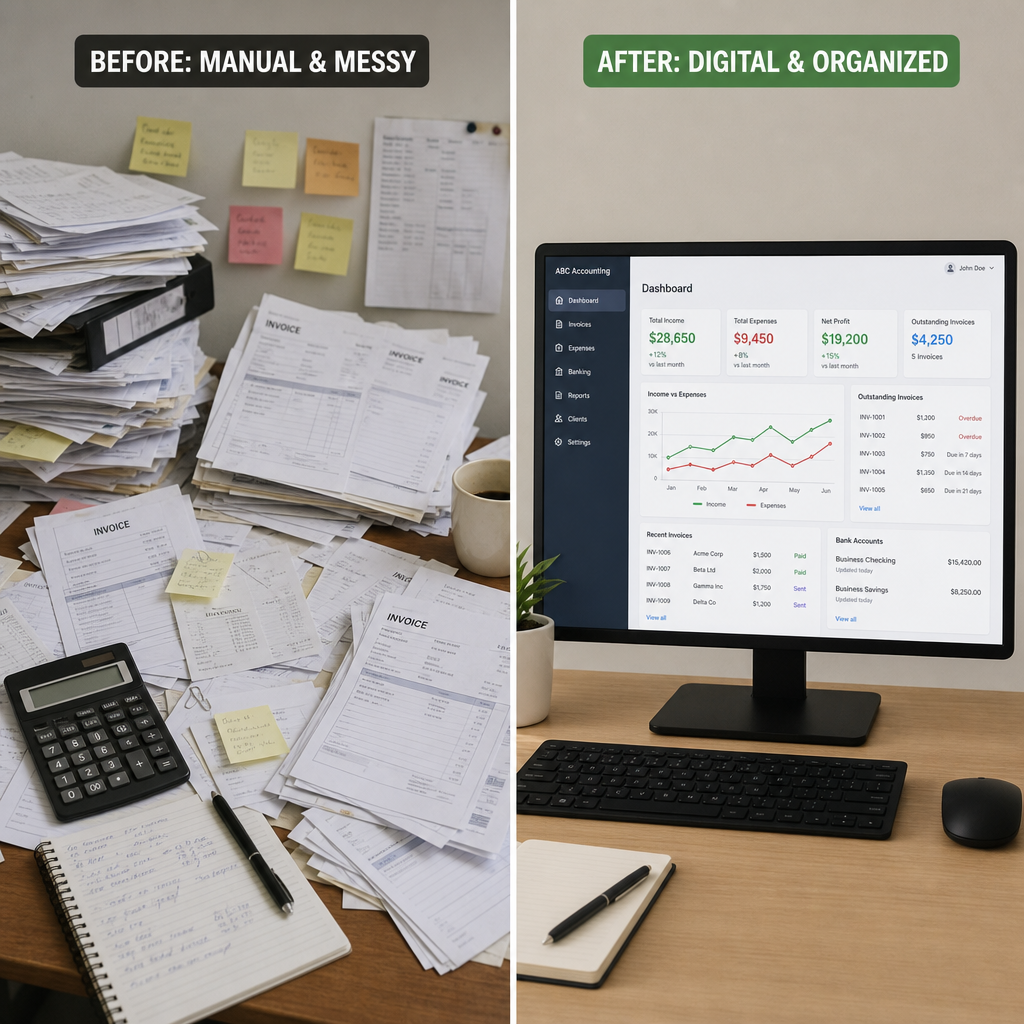
Historically, processing an invoice required significant manual effort. An employee had to physically open the mail, route paper documents to various department heads for handwritten signatures, and manually key information into an accounting system.
When you compare manual vs automated data entry, the drawbacks of the traditional method become glaringly obvious. Manual entry is notoriously slow and prone to human error—such as fat-fingering a monetary amount or typing in the wrong vendor ID. These seemingly small mistakes lead to massive delays and financial leaks.
By transitioning away from manual tasks, businesses are successfully reducing accounts payable overhead. Fewer paper-based workflows mean less money spent on physical storage, postage, and the labor hours required to chase down lost documents.
Establishing Accounts Payable Workflow Best Practices
Streamlining your financial operations starts with a strong foundation. Implementing accounts payable workflow best practices ensures that every invoice is treated with the same level of scrutiny and efficiency.
1. Standardizing Vendor Onboarding Procedures
A streamlined workflow actually begins before you even receive an invoice. Standardizing vendor onboarding procedures is crucial. When a new supplier is added to your system, ensure that all their tax documents, payment preferences, and contact details are collected upfront. This prevents delays later when it is time to process a payment by invoice, ensuring the vendor gets paid according to agreed-upon terms.
2. The Verification Stage
One of the most critical steps in accounts payable is verifying that you actually received what you are being billed for. For businesses dealing with physical goods, this usually involves a specific internal audit.
Here is the three-way matching process explained simply: it is a verification method that ensures three vital documents align perfectly before a payment is issued:
- The Purchase Order (PO): What did you officially request from the supplier?
- The Receiving Report: What goods or services were actually delivered to your business?
- The Invoice: What is the supplier charging you for?
If these three documents match, the invoice is approved. If they do not, the invoice is flagged for investigation.
3. Handling Discrepancies
When items are flagged, it halts the workflow. You might ask, what are common billing discrepancies? Usually, these involve price mismatches (the invoice price is higher than the PO price), quantity differences (you were billed for 50 items but only received 40), or incorrect tax calculations. Having clear, standardized protocols for resolving these exceptions is vital for keeping your workflow moving.
Embracing Digital Transformation in Finance Departments
To truly streamline operations, businesses must move past filing cabinets and spreadsheets. Digital transformation in finance departments is revolutionizing how we handle money, replacing outdated methods with agile, responsive technology.

Going Paperless
The transition starts with digitizing your documents. If you are wondering how to implement paperless invoicing, the process is easier than you might think. Start by requiring vendors to submit invoices via a dedicated billing email address or a self-service vendor portal. For those inevitable paper invoices that still arrive by mail, you can utilize optical character recognition for receipts and invoices. This technology scans physical documents or PDFs and intelligently extracts key data—like vendor name, date, and total amount—directly into your system without manual typing.
Leveraging Modern Software
Once the data is digitized, you need the right tools to manage it. Modern cloud-based accounts payable software features are designed specifically to eliminate bottlenecks. Some of the most valuable features include:
- Automated Approval Routing: The software automatically sends the invoice to the correct department head based on predefined rules (e.g., all IT invoices go to the CTO).
- Audit Trails: Every action taken on an invoice is logged, providing total transparency.
- Online payment billing portals: These allow vendors to check the status of their invoices without having to call or email your AP department, saving time for everyone.
Seamless Connectivity
Your AP software shouldn't exist in a silo. ERP integration for vendor payments is a non-negotiable feature for mid-sized and enterprise companies. By linking your invoice processing software directly with your Enterprise Resource Planning (ERP) system, you ensure that your financial data syncs in real-time. This means your general ledger is always up-to-date, and cash flow forecasting becomes vastly more accurate.
Realizing Accounts Payable Automation Benefits
When you put these digital tools and best practices together, the accounts payable automation benefits are transformative.
First and foremost, automation is the most effective tool for preventing duplicate payment errors. An automated system will instantly flag an invoice if the invoice number, date, and amount match a record that has already been processed. This saves companies thousands of dollars in overpayments that are notoriously difficult to recover.
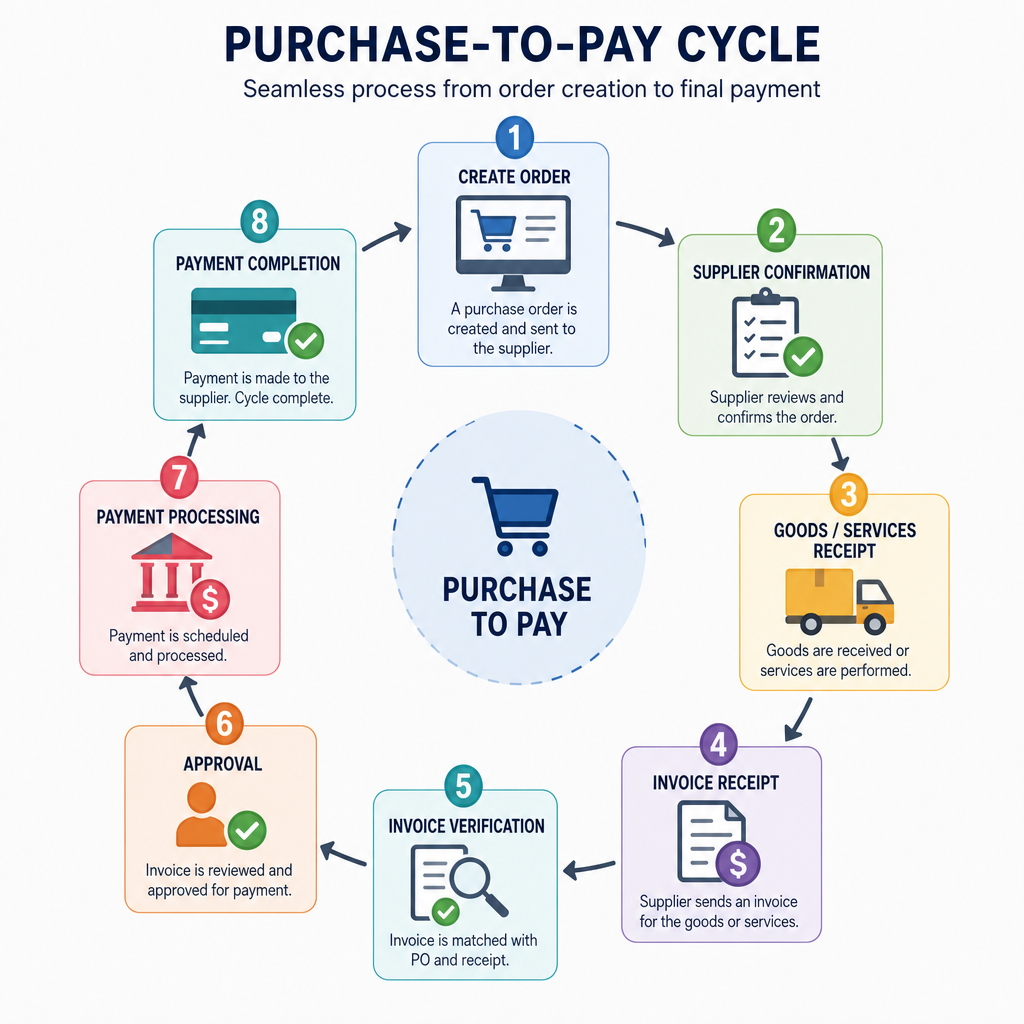
Furthermore, automation plays a massive role in optimizing the purchase-to-pay cycle. The purchase-to-pay (or procure-to-pay) cycle encompasses everything from the initial purchasing decision to the final payment. By removing manual data entry, automating the three-way match, and utilizing instant digital approvals, an invoice that used to take three weeks to process can now be approved and scheduled for payment in a matter of hours.
Faster processing also unlocks new financial opportunities. Many suppliers offer early payment discounts (such as 2% off if paid within 10 days). A streamlined, automated system allows your finance team to easily capture these discounts, effectively turning your accounts payable department into a profit center rather than just a cost center.
How Do You Know Your Streamlining is Working?
Implementing new software and workflows is only half the battle; you must also track your progress. You cannot manage what you do not measure.
Measuring accounts payable efficiency metrics allows you to see the tangible return on your investment. Keep a close eye on these key performance indicators (KPIs):
- Cost Per Invoice: Calculate the total cost of your AP department (salaries, software, overhead) and divide it by the number of invoices processed. Automation should drive this number down significantly.
- Processing Cycle Time: How many days does it take from the moment an invoice is received to the moment it is ready for payment? A streamlined workflow should reduce this to just a few days.
- Exception Rate: What percentage of your invoices require manual intervention due to errors or discrepancies? A high exception rate indicates issues with your vendor onboarding or your purchasing protocols.
- Percentage of Electronic Invoices: Track how many invoices arrive digitally versus on paper. The closer you get to 100% digital, the more efficient your team will be.
- Early Payment Discounts Captured: Keep track of the total dollar amount saved by paying vendors early, thanks to your faster processing speeds.
The Bottom Line
Transforming your financial operations doesn't happen overnight, but the effort is undeniably worth it. By understanding the fundamentals, adopting strong workflow protocols, and leveraging modern software, you can effectively eliminate the chaos of traditional invoice management.
Streamlining your invoice processing workflow empowers your team to shift their focus from tedious, repetitive data entry to strategic financial planning and relationship management. Whether you are standardizing your vendor onboarding, utilizing optical character recognition, or fully optimizing the purchase-to-pay cycle, every step you take toward automation builds a more resilient, scalable, and profitable business.
Take a critical look at your accounts payable processes today. The tools to modernize your finance department are readily available—it is simply up to you to implement them and unlock a new level of financial efficiency.
Q&A
Question: What exactly is invoice processing, and what steps does it include?
Short answer: Invoice processing is the full lifecycle of a supplier invoice—from receipt to payment and recording in the general ledger. It typically sits within accounts payable and involves: receiving the invoice, extracting key data, verifying the purchase (often via three-way matching), securing internal approvals, initiating payment, and posting the transaction to keep financial records current.
Question: Why move away from manual accounts payable processes?
Short answer: Manual AP is slow, error-prone, and costly. Hand-keyed data increases the risk of mistakes (like wrong amounts or vendor IDs), which create delays and financial leaks. Paper-based workflows also drive up spend on storage, postage, and labor to track down documents. By automating data capture and approvals, companies cut overhead, reduce errors, prevent lost invoices, and process payments faster—improving vendor relationships and cash control.
Question: What is three-way matching, and how are discrepancies handled?
Short answer: Three-way matching verifies that the Purchase Order (what was ordered), the Receiving Report (what was delivered), and the Invoice (what is billed) align before payment. If all three match, the invoice is approved; if not, it’s flagged. Common discrepancies include price mismatches, quantity differences, and incorrect tax calculations. Clear, standardized protocols for resolving these exceptions keep the workflow moving and prevent bottlenecks.
Question: How do we go paperless and what software capabilities matter most (including ERP integration)?
Short answer: Going paperless starts by requiring digital submissions via a billing email or vendor portal and using optical character recognition (OCR) to extract data from any remaining paper/PDF invoices. Modern AP software should offer automated approval routing, audit trails, and online vendor portals for status visibility. ERP integration is essential so invoice data syncs in real time, keeping the general ledger up to date and improving cash flow forecasting.
Question: How can we tell if our streamlining efforts are working?
Short answer: Track AP efficiency with these KPIs and expect improvements as automation matures:
- Cost Per Invoice: Total AP costs divided by invoices processed—should drop significantly.
- Processing Cycle Time: Days from receipt to payment-ready—aim for a few days instead of weeks.
- Exception Rate: Share of invoices needing manual intervention—lower rates signal better onboarding and purchasing controls.
- Percentage of Electronic Invoices: Higher digital share correlates with efficiency; target near 100%.
- Early Payment Discounts Captured: Total savings from paying early—should rise with faster processing.