
Getting paid should be the most rewarding part of running a small business or managing a freelance career. Yet, for many entrepreneurs, the billing process is a source of unnecessary stress, administrative headaches, and delayed payments. If you are still manually calculating totals on a spreadsheet or typing out payment requests in a blank document, it is time for an upgrade.
Using a reliable free invoice maker can instantly transform your financial workflow. With the right tools, you can eliminate manual errors, impress your clients with professional branding, and get money into your bank account much faster.
In this comprehensive guide, we will explore the best tools available, dive into standard billing practices, show you exactly how to create professional invoices for free , and when to use a free online invoice template for quick turnaround.

Why Upgrade Your Invoicing System?
Before diving into specific platforms, it is important to understand why leaving behind manual data entry is crucial for your business growth. Establishing professional billing practices for freelancers and small businesses sets the tone for your client relationships. It shows you are organized, reliable, and serious about your work.
Transitioning to modern digital tools offers several distinct advantages. The benefits of cloud-based invoicing systems are immense: they allow you to access your financial records from any device, back up your data securely, and keep real-time tabs on who owes you money. Cloud software also streamlines your administrative work, meaning you spend less time chasing checks and more time focusing on your core business operations.
The Anatomy of a Flawless Invoice
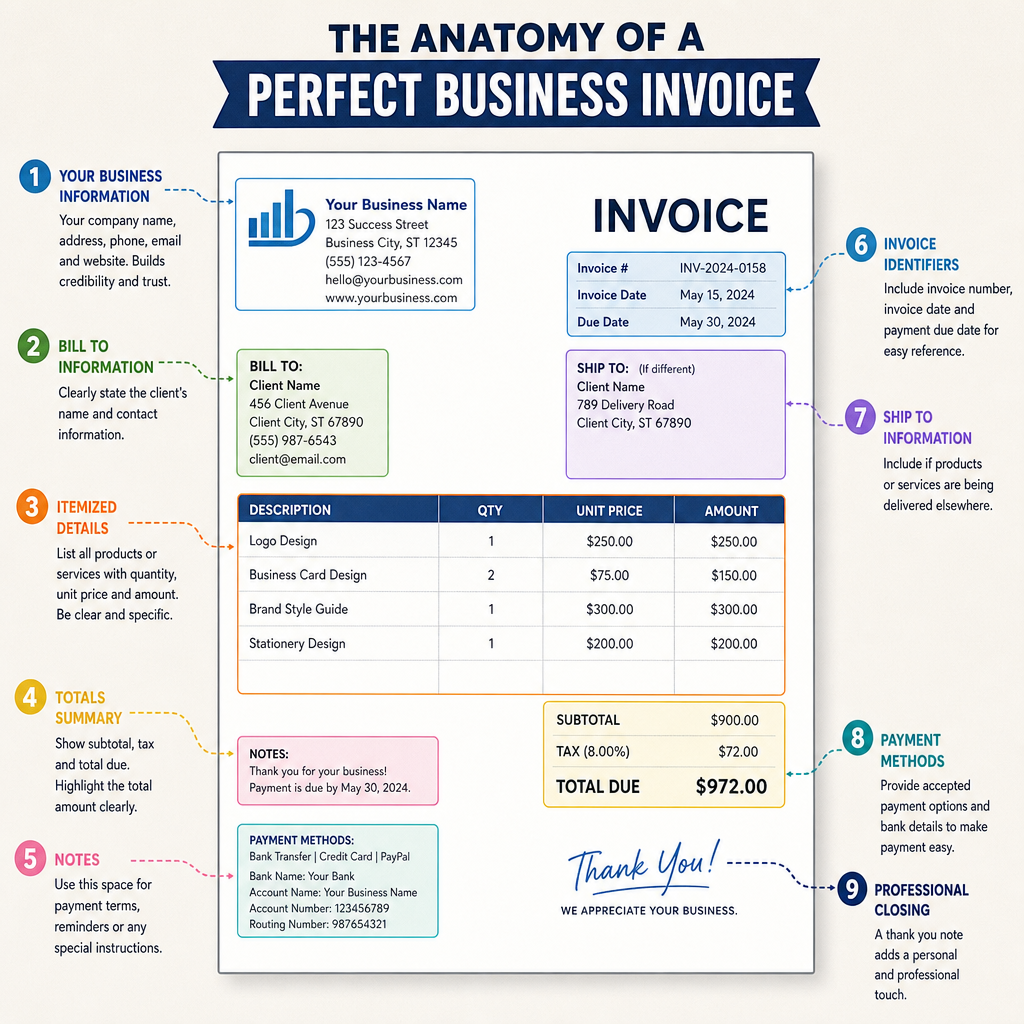
Whether you are using a dedicated software platform or a simple online invoice template, every bill you send needs to contain specific, clearly laid out information. Missing details can lead to client confusion and payment delays.
If you are wondering what should be included in a billing statement, here is the ultimate checklist:
- Professional Header: Your business name, logo, address, and contact information.
- Client Information: The name, address, and contact details of the person or company you are billing.
- Invoice Number & Date: A unique, sequential identifier for the document, alongside the date of issue and the payment due date.
- Itemized Services or Products: A clear breakdown of what you provided, including quantities, hourly rates, or unit prices.
- Subtotal, Taxes, and Total: The sum of your services before and after taxes or discounts.
- Payment Terms: Clear instructions on how and when you expect to be paid.
Furthermore, depending on your region and business structure, you must adhere to tax compliant invoice requirements. This often means including your registered business tax ID, the client's tax ID, and a clear, separate line item detailing the exact amount of VAT, GST, or sales tax applied to the transaction.
Top Free Invoice Makers and Software
Finding the right tool depends entirely on your business's specific needs. Some business owners need comprehensive accounting suites, while others just need a quick way to generate a PDF. Here is a breakdown of the best options available today.
Dedicated Invoicing Software Platforms
Wave InvoicingWave is widely considered one of the best online billing software alternatives to expensive, premium accounting tools. It offers a completely free, highly robust invoicing feature set. You can customize your layout, set up recurring bills, and manage your clients seamlessly.
Zoho Invoice Zoho recently made its dedicated invoicing platform completely free for small businesses. It is an incredibly powerful free invoice maker that allows for time tracking, expense logging, and client portals. If you want a full-featured suite without the monthly subscription fee, Zoho is a top contender.
Square Invoices If you already use Square for in-person transactions, their free digital invoicing tool is a natural extension. It allows you to send unlimited estimates and invoices, track their status in real-time, and let clients pay instantly via credit card (though standard payment processing fees apply).
Customizable Templates for Quick Billing
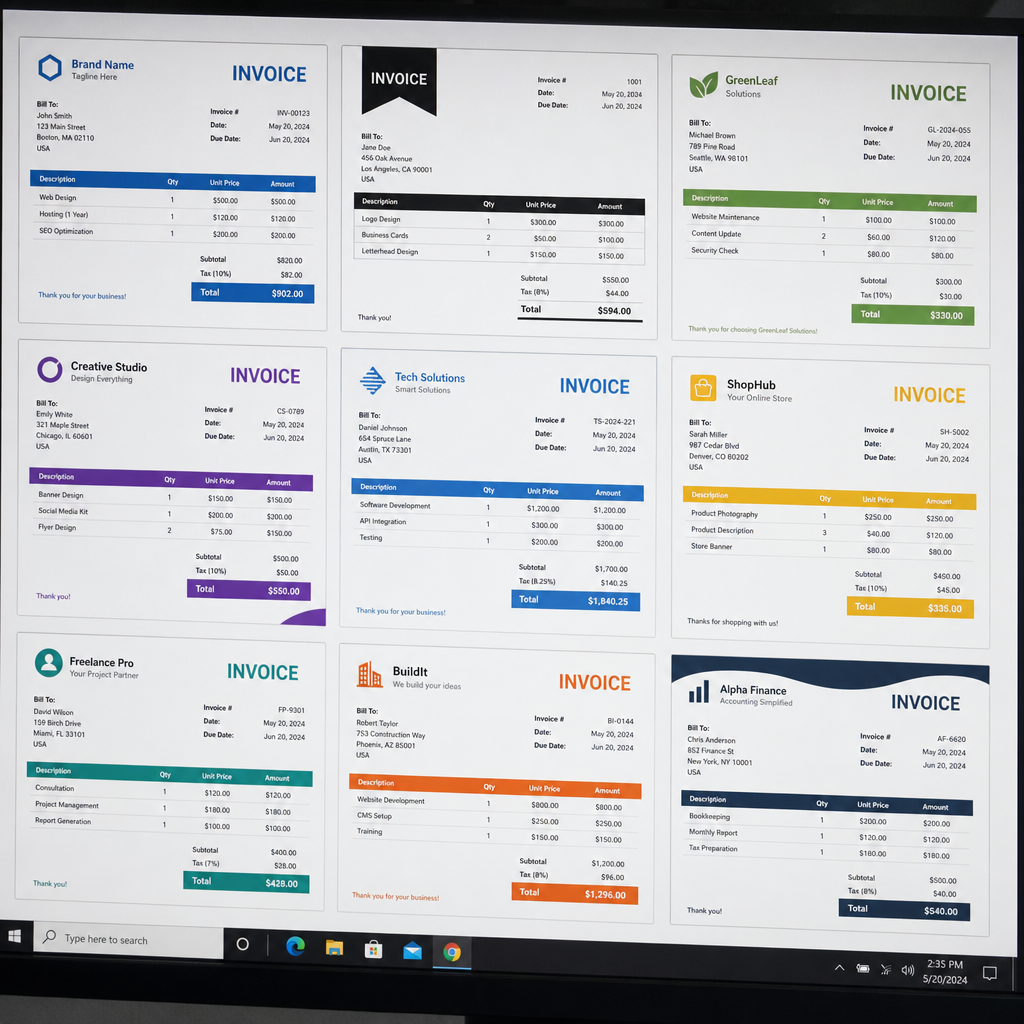
Sometimes, you don't need a whole software ecosystem; you just need a reliable document format. If you prefer a simpler approach, utilizing customizable invoice templates for small businesses is highly effective. You can also find invoice templates free to download if you prefer a quick start.
- Word and Excel Solutions: Many entrepreneurs start by searching for an invoice template free word download. Microsoft offers dozens of built-in templates that you can easily adapt to your brand colors and fonts.
- Canva: If aesthetics are your top priority, Canva offers hundreds of beautifully designed options. You can easily find an invoice free template that matches your specific industry, whether you are a graphic designer, a consultant, or a contractor.
- Web-Based Generators: Tools like Invoice Generator let you fill out a free online invoice template directly in your web browser. Many sites also provide invoice templates free for quick edits. Once you input your data, you simply click download. With an invoice template invoice creation takes less than a minute.
Smart Workflows for Faster Payments
Having a beautifully designed bill is only half the battle. The other half is ensuring your client actually pays it on time. Implementing a smart, automated workflow will dramatically reduce your administrative burden.
Establish Clear Terms and Conditions
Never leave your payment timeline open to interpretation. Establishing standard payment terms and conditions upfront is crucial. Use clear language like "Net 30" (payment due in 30 days) or "Due on Receipt." Ensure these terms are prominently displayed on every document you send.
Automate the Follow-Up
Following up on money owed is often an uncomfortable task. Take the emotion out of it by sending payment reminders to clients automatically. Most cloud-based platforms allow you to schedule polite, pre-written emails that trigger a few days before a bill is due, on the due date, and when the bill is past due.
Enforce Late Fees
To encourage timely payments, be transparent about the consequences of missing the deadline. Managing late fees on unpaid bills requires you to state your late fee policy clearly on your initial contract and the invoice itself (e.g., "A 1.5% late fee will be applied per month on overdue balances").
Remove Friction from the Payment Process
The easier you make it for a client to pay, the faster they will do it. Automating client payment processing by enabling "Pay Now" buttons directly on your digital bills allows clients to settle their accounts using a credit card or bank transfer instantly. If you are not using an automated portal, you should be generating PDF invoices for email so the client receives a static, universally readable document that they can easily forward to their accounting department.
Advanced Invoicing Tips and Best Practices
As your business scales, your financial operations will naturally become more complex. Here are a few advanced concepts to keep in mind as you refine your billing strategy.
Understanding Invoice Types
Not all billing documents serve the same purpose. For example, it is vital to understand the difference between proforma and commercial invoices, especially if you deal with physical goods or international clients.
- A Proforma Invoice is essentially a preliminary bill of sale sent to buyers in advance of a shipment or delivery of goods. It describes the items, prices, and delivery terms, acting as a good faith estimate.
- A Commercial Invoice, on the other hand, is the final, official request for payment once the service is rendered or the goods are shipped. It is a legally binding document used heavily in customs declarations.
Tracking the Money
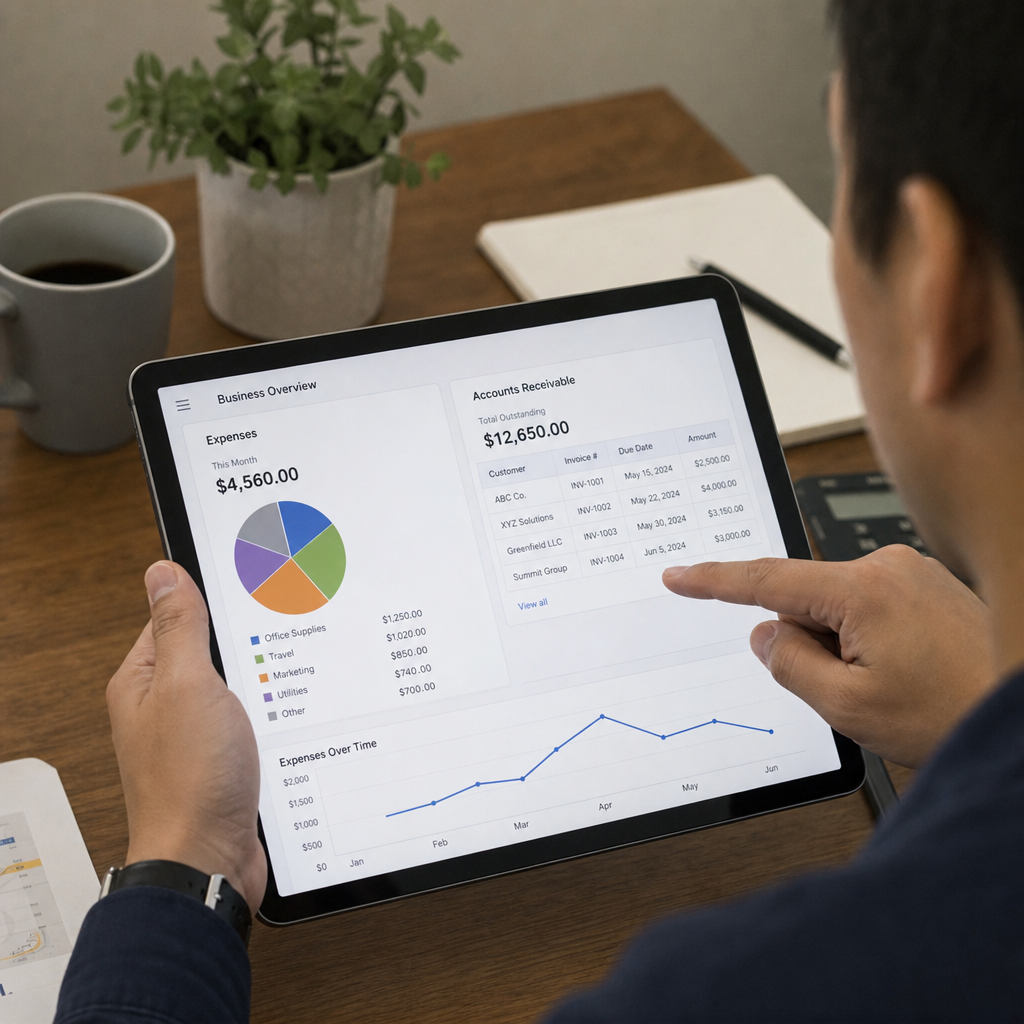
Sending out bills is pointless if you do not monitor what comes back. Learning how to track accounts receivable efficiently is the backbone of healthy cash flow. Use your software's dashboard to run aging reports, which categorize unpaid bills by how many days they are past due (e.g., 1-30 days, 31-60 days). This gives you a clear visual of where your money is tied up and which clients require a phone call.
Adding Security and Legitimacy
In corporate environments or high-ticket consulting, clients often require additional verification before releasing funds. Integrating digital signatures in billing documents adds a layer of non-repudiation and legal authenticity. Many modern PDF tools and dedicated software platforms allow you to append a verified e-signature, assuring the client that the document has not been tampered with and comes directly from your business.
Final Thoughts
Managing your small business finances doesn't require an accounting degree or an expensive software subscription. By taking advantage of a high-quality free invoice maker, you can elevate your brand's professionalism while drastically reducing the time you spend on administrative chores.
Whether you choose a comprehensive platform like Wave, or simply download a sleek, customizable template, the key is consistency. Define your payment terms clearly, set up automated reminders, and always make it as easy as possible for your clients to hand over their money. By implementing these streamlined billing practices, you can finally take the stress out of getting paid and focus your energy on what truly matters: growing your business.
Frequently Asked Questions
Question: Why should I switch from manual invoicing to a cloud-based tool?
Short answer: Cloud-based invoicing eliminates manual errors, elevates your professionalism, and saves time. You can access records from any device, keep secure backups, and see in real time who owes you money. By streamlining admin tasks like tracking, reminders, and client management, you spend less time chasing payments and more time on your core business.
Question: What must every professional, tax-compliant invoice include?
Short answer: At minimum, include: your business header (name, logo, address, contact), client details, a unique sequential invoice number, the issue date and due date, an itemized list of products/services with quantities and rates, a subtotal, taxes, and the final total, plus clear payment terms. For tax compliance, add your registered business tax ID, the client’s tax ID (where required), and show VAT/GST/sales tax as a separate, clearly labeled line with the exact amount.
Question: Which free invoice makers are best, and when should I use templates instead of software?
Short answer: For full-featured software, consider:
- Wave Invoicing: robust and free, with customization, recurring invoices, and client management.
- Zoho Invoice: free for small businesses, with time tracking, expense logging, and client portals.
- Square Invoices: great if you already use Square; send unlimited estimates/invoices, track status, and accept instant card payments (standard processing fees apply).
Use templates when you just need a quick, branded document: Word/Excel have built-in templates; Canva offers highly designed options by industry; web-based generators (e.g., Invoice Generator) let you fill a free online form and download a PDF in under a minute.
Question: How can I get clients to pay faster?
Short answer: Set unambiguous terms (e.g., “Net 30” or “Due on Receipt”) and display them prominently. Automate polite reminders a few days before due, on the due date, and after if overdue. State and enforce late fees upfront (e.g., “1.5% per month on overdue balances”). Reduce friction by enabling “Pay Now” buttons for card/bank transfers; if not using portals, send universally readable PDF invoices clients can forward internally.
Question: What’s the difference between a proforma invoice and a commercial invoice?
Short answer: A proforma invoice is a preliminary estimate sent before goods ship or services are delivered; it outlines items, prices, and terms as a good-faith quote. A commercial invoice is the final, legally binding payment request issued after delivery or shipment, and it’s the document used for customs declarations in international transactions.