
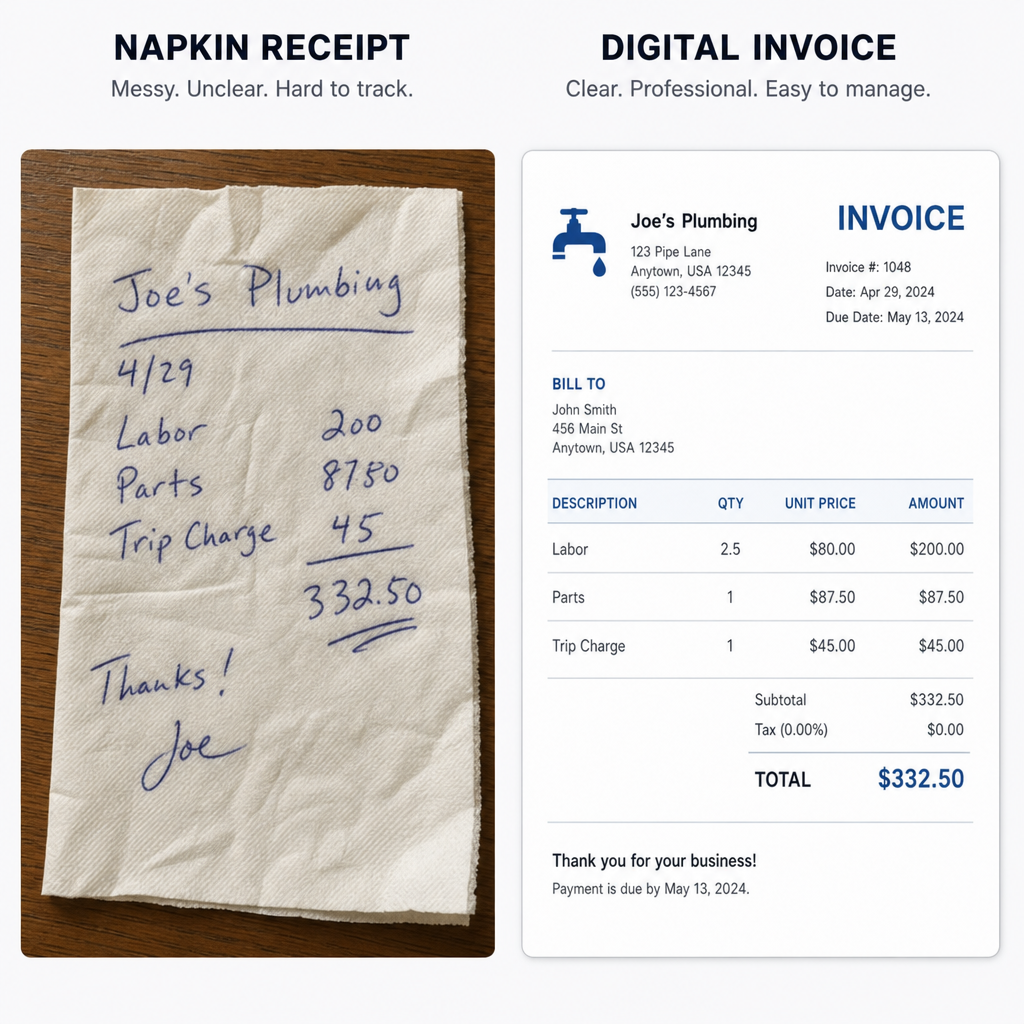
You've done the hard work—whether that means walking a neighborhood's dogs or designing a startup's new logo—so now it's time to look like the professional you are. A quick text message asking for your money might work initially, but it rarely builds long-term client trust. Transitioning to structured billing means leaving those disorganized, casual requests behind forever.
Industry data reveals that clients actually pay faster when they receive clear, branded documents rather than a confusing manual spreadsheet. Think of a digital invoice maker as the modern, automated upgrade to those old carbon-copy receipt pads that independent contractors used to carry. Instead of wrestling with broken document margins, this software generates professional invoices in just a few clicks.
Are you ready to stop stressing over how to legally and politely collect your cash? This guide shows you how to use a free invoice creation tool that instantly elevates your business reputation, so you can create invoice free and get started fast. Demystifying intimidating terminology is part of the process: a "Line Item" simply refers to the specific service you provided, and "Net 30" is the standard rule stating the client has 30 days to pay.
Why Your Current Spreadsheet Is Costing You Hours of Admin Work
Stop wrestling with broken spreadsheet formulas every time you finish a job. While typing up a bill in Word feels simple at first, manual methods silently steal your time. Most new business owners save up to two hours of admin work per week simply by refusing to manually create invoice template layouts from scratch.
The biggest hidden cost of these old methods is the risk of data entry errors. When you copy and paste last month's business invoice template for a brand new client, it is incredibly easy to accidentally leave the wrong date or an old total. These tiny mistakes look unprofessional and instantly give your clients an excuse to delay your payment while they wait for a correction.
Clarity is just as crucial as accuracy, which is exactly where itemized service descriptions come in. Instead of charging one vague total for "design work," breaking your services down into detailed individual lines—like "three hours of logo edits"—prevents client confusion. Using an online invoice creator formats these specific details automatically so your customer never questions the final amount.
Ditching clunky documents allows you to present a polished, dispute-free bill that clients respect. Dedicated software outsmarts a blank spreadsheet by eliminating formatting headaches, but the document itself must still contain the right information. Five essential parts of an invoice ensure you get paid promptly.
The 5 Essential Parts of an Invoice That Ensure You Get Paid
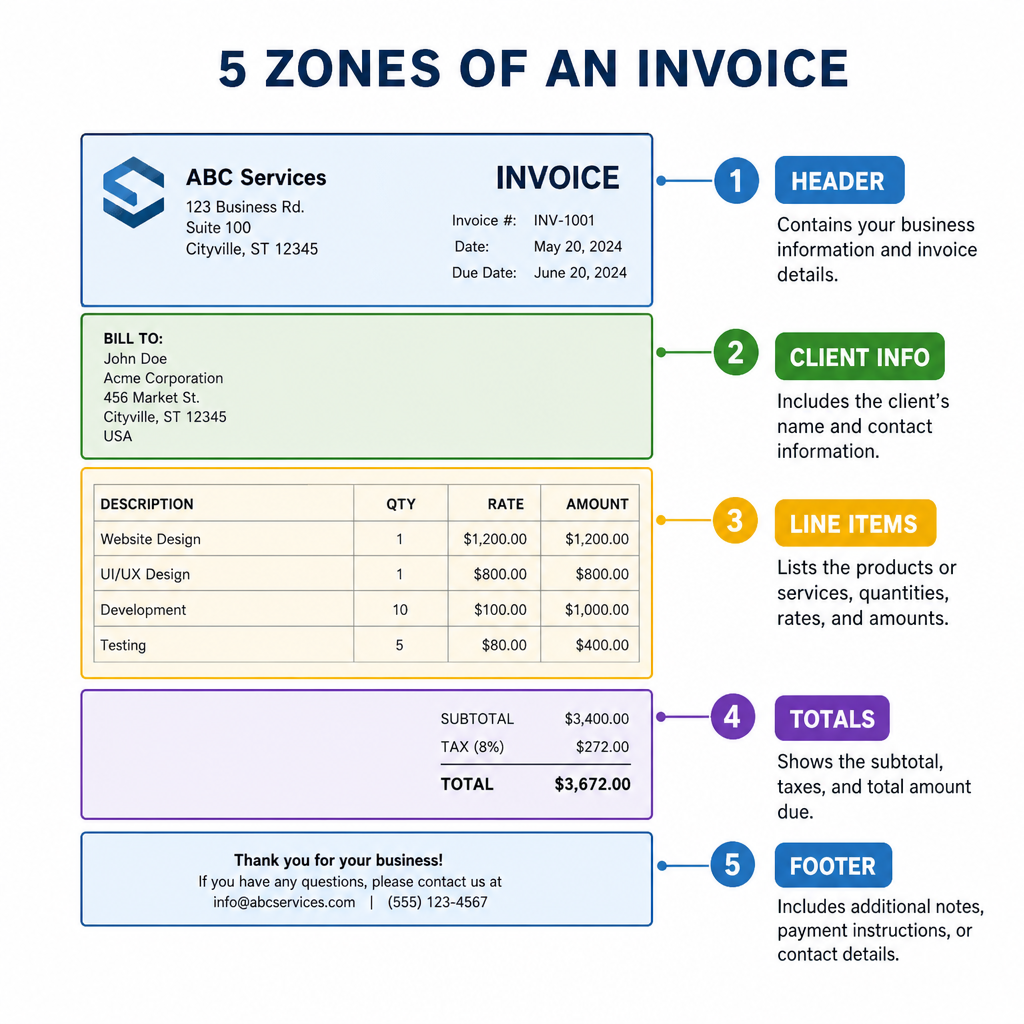
Getting paid on time starts with presenting a document that leaves zero room for guesswork. Learning how to format professional invoices is like handing over a clear business ID card; it tells the client exactly who is asking for money. To guarantee your client processes your request quickly, you must include the essential components of valid bills:
- Contact Information (yours and the client's)
- Unique Invoice Number (for tracking)
- Itemized List (services provided)
- Total Due (including taxes)
- Payment Terms (when to pay)
That unique Invoice ID acts as a digital fingerprint for your billing. If a dog walking client accidentally pays you twice or loses the document, a simple tracking number like "INV-001" helps both of you find the exact record instantly, preventing tax season panic.
Setting the rules for exactly when the money arrives is just as critical as the total amount. Many businesses use net 30 credit terms, which simply means the client has exactly 30 days from the invoice date to complete the payment. You should also include clear remittance details—the specific instructions on how to send the money, whether through a bank transfer link or an online payment portal.
Providing these five elements transforms a casual request for cash into a legally binding document that commands respect. A perfected layout sets the stage for prompt payment, but handling clients who ignore deadlines requires automated billing and firm late fee policies.
Stop Chasing Checks with Automated Billing and Late Fee Policies
Tracking down missing payments easily ruins a productive week. Instead of manually emailing clients to ask for your money, modern automated billing solutions for freelancers handle the awkward follow-ups for you. Software can automatically send gentle nudges when due dates pass, saving you hours of administrative work.
Clear consequences encourage prompt payment. Adding a simple clause, like a 2% monthly charge on overdue balances, acts as a strong deterrent. Reviewing standard late fee policy examples helps you write terms that are professional rather than aggressive. You can pair these policies with your software to schedule three polite but firm late payment reminders:
- 1 Day Late: "Just a quick note that your invoice was due yesterday."
- 7 Days Late: "Your payment is now one week overdue. Please submit payment to avoid late fees."
- 14 Days Late: "This is a final reminder before a 2% late charge is applied to your balance."
For clients requiring monthly services, you can bypass these manual tasks entirely. Enabling recurring subscription features allows your invoice maker to automatically generate bills on a set schedule, securing steady cash flow. With predictable income flowing, protecting your business through cloud-based record keeping creates an essential legal safety net.
Building a "Legal Safety Net" with Cloud-Based Record Keeping
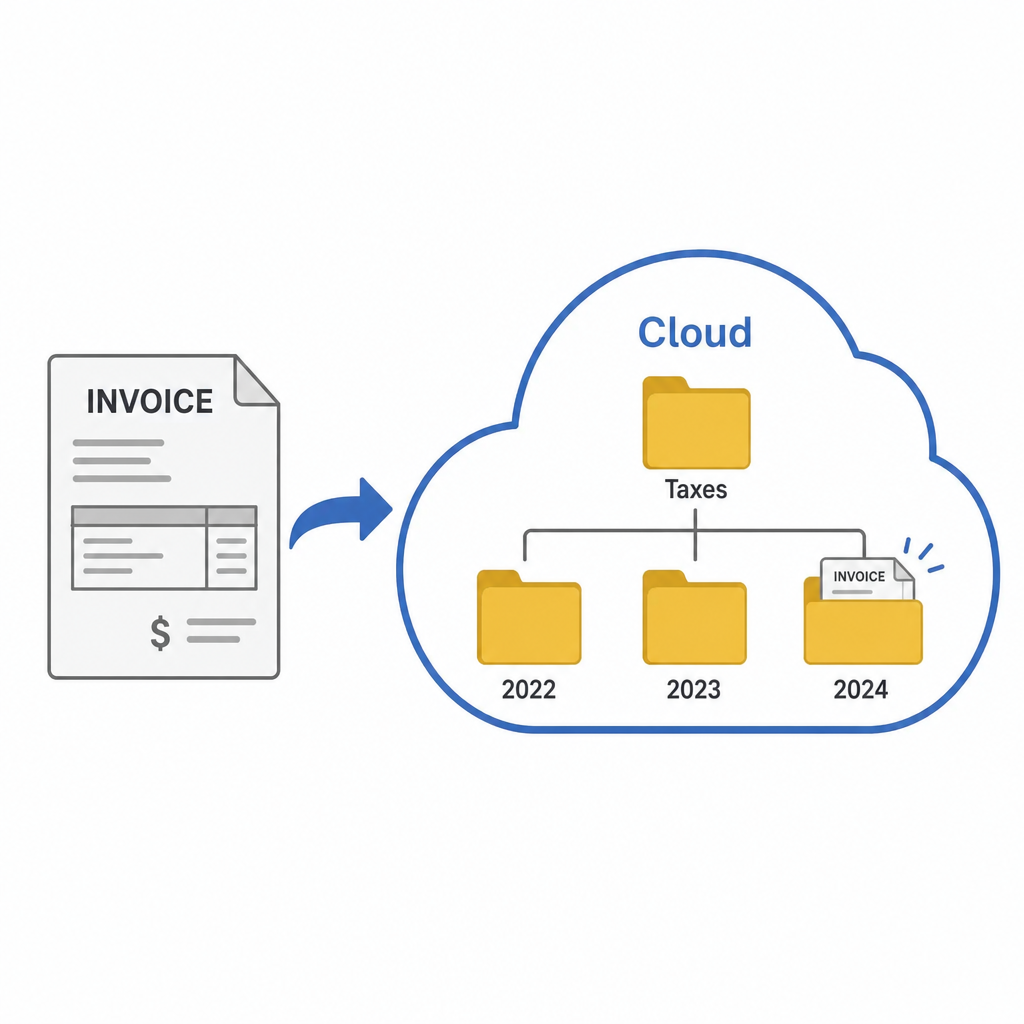
Tax season usually brings panic when you have to dig through shoeboxes of paper receipts. Moving to a digital invoice maker replaces those easily lost papers with a secure digital file cabinet. This shift to cloud-based accounts receivable management—a system where your uncollected payments are tracked online rather than in a notebook—means you can easily check who owes you money from your phone, laptop, or tablet.
Automatically saving every document creates a legal safety net for your business. Streamlining business transaction processing through an app ensures every penny earned is accurately recorded for the government. You never have to guess what you made in a year, because the software instantly organizes your financial history for stress-free tax filing.
Selling your services outside your home country often feels complicated, but your software handles the heavy lifting. Managing tax compliance for international sales becomes much easier when your invoice maker automatically applies the correct regional tax rates to your bill. You stay perfectly legal without needing to hire an expensive accountant or memorize foreign tax codes.
Building this organized foundation protects your hard work and prepares you for future growth. These digital tools safeguard your business, preparing you to modernize your billing process immediately.
Your 3-Step Action Plan to Modernize Your Billing Today
You have officially moved past the days of typing awkward emails and wrestling with messy spreadsheets. By modernizing your billing process, you are no longer just asking for money—you are presenting a polished front that clients take seriously. This professional leap translates into immediate results: securing faster payment cycles and reclaiming hours of administrative time each week.
Putting this into practice requires just a 15-minute setup. Implement these revenue collection improvements right now with this quick checklist:
- Choose a tool: Select reliable free invoice software that fits your current business size and lets you create invoice free.
- Brand your template: Add your logo and clearly define your payment rules. You can also create invoice template variations for different client types.
- Send your first automated invoice:Create an invoice for your next client to see how simple getting paid can be.
You can always scale to paid platforms as your client roster expands, but starting simple builds instant confidence. You no longer need to view billing as a stressful chore that steals your weekends. Instead, see it as a powerful business asset that protects your time, ensures you get paid promptly, and allows you to focus entirely on doing the work you actually love.
Q&A
Question: Why should I switch from spreadsheets or Word to an invoice maker?
Short answer: An invoice maker saves time, reduces errors, and helps you get paid faster. It can save new business owners up to two hours per week by eliminating manual formatting and data entry. Clear, branded invoices look professional and are easier for clients to process, while automated itemization prevents confusion and disputes. Dedicated tools also minimize copy-paste mistakes (like wrong dates or totals) that can delay payments.
Question: What are the five essential parts of a professional invoice, and why do they matter?
Short answer: Include the following to ensure quick, dispute-free payment:
- Contact Information (yours and the client’s): Identifies both parties clearly.
- Unique Invoice Number: Acts like a digital fingerprint (e.g., “INV-001”) for easy tracking and audit consistency.
- Itemized List of Services: Breaks work into clear line items (e.g., “three hours of logo edits”) to prevent confusion.
- Total Due (including taxes): Shows a clear, final amount.
- Payment Terms: State when and how to pay—e.g., Net 30 means the client has 30 days from the invoice date; include remittance details such as bank transfer info or a payment portal link.
Having these elements transforms a casual request into a professional, legally credible document that speeds approval.
Question: How do automated reminders and late fee policies help me stop chasing payments?
Short answer: Automation handles follow-ups so you don’t have to. Set your software to send polite reminders on a schedule (for example: 1 day late, 7 days late, and 14 days late as a final notice). Pair this with a clear late fee (e.g., 2% monthly on overdue balances) to encourage on-time payment without sounding aggressive. For ongoing work, enable recurring invoices to secure predictable cash flow and avoid manual billing altogether.
Question: How does cloud-based record keeping create a “legal safety net” and simplify taxes—especially for international sales?
Short answer: Storing invoices in the cloud gives you a secure, organized, always-accessible history of every transaction. Automatic saving ensures every dollar earned is recorded for stress-free tax filing, and you can instantly see who owes you money from any device. For cross-border work, many invoice makers automatically apply the correct regional tax rates, helping you stay compliant without memorizing foreign rules or hiring an expensive accountant.
Question: What’s the quickest way to modernize my billing today?
Short answer: Follow this 15-minute setup:
- Choose a tool: Pick reliable free invoice software that lets you create invoice free.
- Brand your template: Add your logo and clarify payment rules; create variations for different client types if needed.
- Send your first automated invoice: Try it with your next client to experience faster, simpler payments.
You can scale to paid plans later—starting simple builds confidence and immediately frees up time.